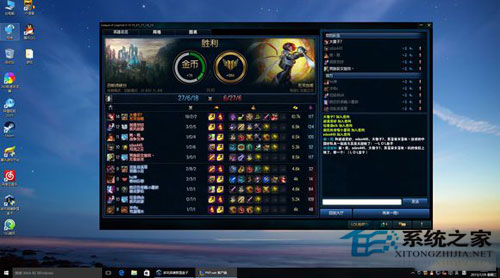
《英雄聯盟》在 Win10 啟動緩慢,主因遊戲啟動器會同步啟動多個騰訊下載/直播/輔助程序 (TenioDL、LQT、TQM 等),佔用資源延長進入遊戲時間。透過「軟體限制原則」封鎖這些非必要程序,可大幅加快啟動。
secpol.msc)。C:\Program Files (x86)\Common Files\Tencent\QQDownload\131\Tencentdl.exe
C:\Users\<用戶名>\AppData\Roaming\Tencent\英雄聯盟\*\TenioDL\TenioDL.dll
C:\Users\<用戶名>\AppData\Roaming\Tencent\英雄聯盟\*\TenioDL\TenioDL.exe
C:\Users\<用戶名>\AppData\Roaming\Tencent\英雄聯盟\*\TenioDL\TenioDL_core.dll
C:\Users\<用戶名>\AppData\Roaming\Tencent\遊戲人生cross\teniodl\TenioDL.dll
C:\Users\<用戶名>\AppData\Roaming\Tencent\遊戲人生cross\teniodl\TenioDL.exe
C:\Users\<用戶名>\AppData\Roaming\Tencent\遊戲人生cross\teniodl\TenioDL_core.dll
<安裝盤>:\英雄聯盟\Cross\Apps\LQT\LQT.dll
<安裝盤>:\英雄聯盟\Cross\CrossProxy.exe (使用 TGP/WeGame 啟動者勿封鎖)
<安裝盤>:\英雄聯盟\TQM\TQMCenter.exe (需看直播者勿封鎖)
<安裝盤>:\英雄聯盟\Cross\Apps\LQT\GamePlus\Bin\broadcasting.exe
注意:路徑中 * 代表版本號資料夾 (如 C6467A8F8E25869F5354DCB01BB89F20),請至實際目錄確認完整路徑。
LeagueClient.exe、Client.exe 不受影響。⚠ 封鎖 CrossProxy.exe 可能導致 TGP/WeGame 無法正常啟動遊戲。
⚠ 封鎖 TQMCenter.exe 將無法觀看遊戲內直播。
⚠ 遊戲更新後路徑可能變更,需定期檢查調整。
⚠ 家庭版 Win10 無「本地安全性原則」,可改用註冊表或第三方軟體限制工具 (如 AppLocker 替代方案)。
精準封鎖非核心騰訊程序,讓《英雄聯盟》在 Win10 起跑更輕快。