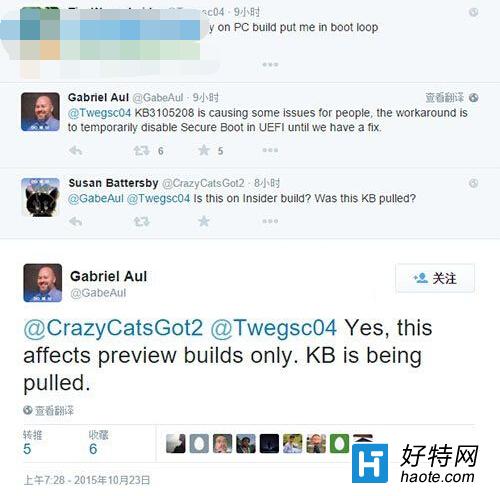
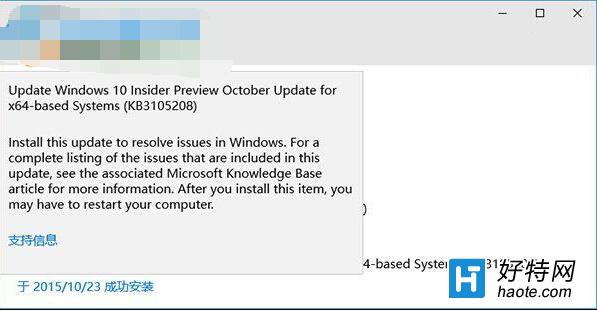
KB3105208 為早期 Insider Preview 推送的測試性更新,包含配置更新,導致大量使用者安裝後出現藍畫面、死機。Insider 計畫負責人 Gabriel Aul 釋出官方臨時緩解方案:
後續建議:微軟後續已釋出修正版更新,建議使用者重新開啟 Windows Update 自動更新,獲取最新修正補丁。此問題僅發生於早期 Insider Preview 版本,正式版用戶不受影響。
Win10 磁碟配額管理設定限制使用者磁碟空間使用量
Win10 開機彈出 JS 腳本錯誤?多半是中毒,建議全盤掃毒並檢查啟動項
Win10 新增網路印表機完整教學:加入憑證管理器儲存密碼、透過 IP 或主機名稱連線
Win10 管理員帳戶無法開啟特定程式?修改登錄 FilterAdministratorToken 允許高權限執行
Windows 10 移除「英文 (美國) 美式鍵盤」輸入法恢復 Ctrl+Shift 切換習慣
Windows 10 全新開始選單完整使用教學
Win10 工作列搜尋框太佔地方?三種模式隨心切換,乾淨俐落
Win10 如何移除 NVIDIA 控制面板右鍵選單項目?控制面板內建設定一鍵隱藏