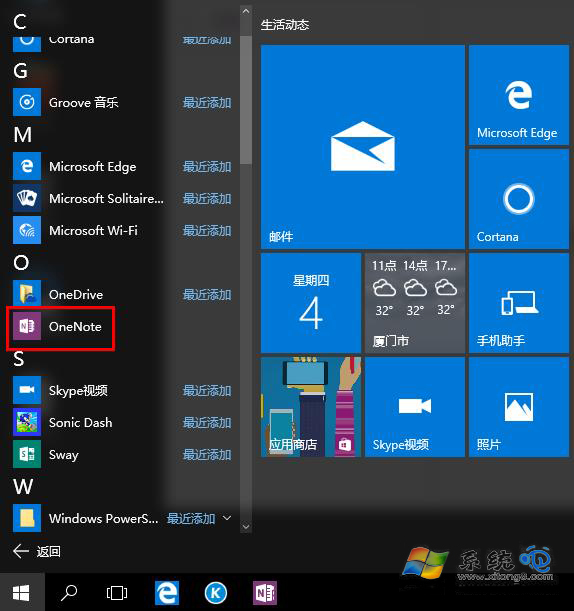
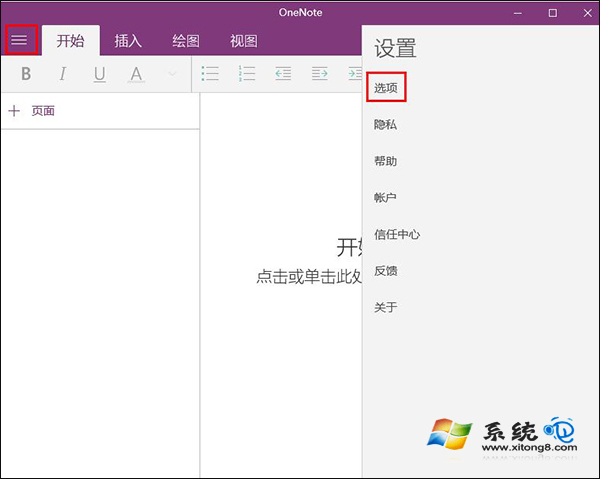
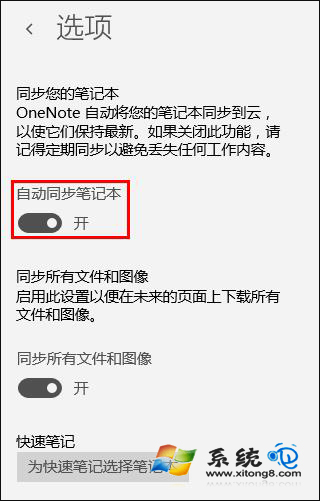
OneNote 內建雲端同步功能,啟用後可跨裝置即時存取筆記內容,適合多裝置作業與團隊協作。本文說明如何在 Win10 版 OneNote 中開啟自動同步。
設定完成後,使用相同 Microsoft 帳戶登入的所有裝置(手機、平板、另一台電腦)均可即時查看與編輯筆記內容。
Windows 10 周年更新 Edge 瀏覽器支援廣告攔截:Adblock Plus 正式上架 Windows Store
Win10 查看歷史問題報告與解決方案:指令啟動 werconcpl.dll 與控制台「安全性與維護」雙軌查詢
Win10 更新失敗錯誤 0x80070002 (80070002) 官方標準修復:停止服務、清理 SoftwareDistribution 快取、重啟服務三步曲
Win10 IE 首頁被惡意軟體竄改?使用安全軟體鎖定首頁
Win10 Edge 瀏覽器設定首頁(啟動頁面)完整教學
Win10 筆電建立 Wi-Fi 熱點 (虛擬無線網路) 指令教學:netsh wlan hostednetwork 完整參數
Win10 停止接收內部測試版更新設定教學
Win10 一開機就黑屏怎麼辦?硬體/軟體雙向排查與禁用鎖定畫面