Windows 10 關機需點擊「開始 → 電源 → 關機」三步驟,較為繁瑣。透過撰寫簡單 VBS 腳本呼叫 Shell.Application.ShutdownWindows 方法,並透過登錄檔加入桌面/檔案總管右鍵選單,即可實現右鍵一鍵呼出關機對話方塊,大幅提升效率。
dim objshell
set objshell = CreateObject("shell.application")
objshell.ShutdownWindows
set objshell = nothingshutdown.vbs(編碼 ANSI,副檔名 .vbs)。C:\Windows\ 目錄(需管理員權限,點擊「繼續」)。Windows Registry Editor Version 5.00
[HKEY_CLASSES_ROOT\Directory\Background\shell\SuperHidden]
@="關閉 Windows 10"
[HKEY_CLASSES_ROOT\Directory\Background\shell\SuperHidden\Command]
@="WScript.exe C:\\Windows\\shutdown.vbs"regshutdown.reg(副檔名 .reg)。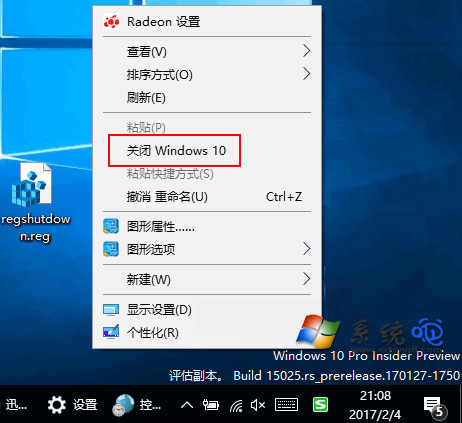
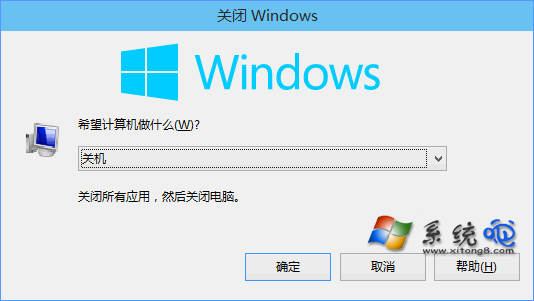
桌面或檔案總管空白處右鍵 → 選擇 「關閉 Windows 10」 → 彈出標準關機對話方塊 → 選擇關機/重新開機/睡眠/休眠。
開啟 regedit,刪除機碼 HKEY_CLASSES_ROOT\Directory\Background\shell\SuperHidden,並刪除 C:\Windows\shutdown.vbs。
HKEY_CLASSES_ROOT\Directory\Background\shell\OpenPowerShellHerecmd.exe /k cd %V