Win10 Creators Update (1703) 引入 遊戲模式:將前景遊戲設為最高排程優先權,CPU/GPU/記憶體/網路資源優先配給,理論提升幀率、降低波動。
開啟步驟(圖文)
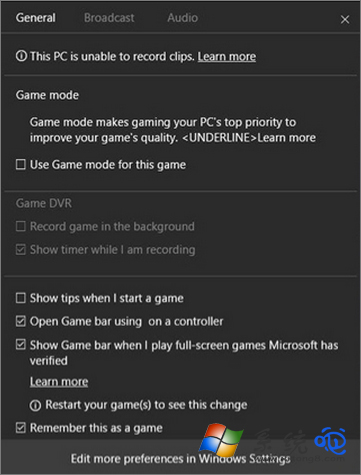
- 遊戲運行時按 Win+G 開啟 遊戲列 → 齒輪圖示 設定。

- 遊戲模式 索引標籤 → 開啟 「使用遊戲模式」 開關。
運作原理與實測
- 前景遊戲進程優先權提升至 High/Realtime,背景進程降為 Below Normal。
- GPU 排程器優先提交遊戲指令緩衝區。
- 實測:CPU 密集型遊戲(CS:GO、LOL、Valorant)平均幀率 +3~8%,1% Low 幀明顯提升;GPU 瓶頸遊戲改善有限。
注意事項
- 早期版本(1703~1803)遊戲模式曾導致部分遊戲閃退/掉幀,1903 後大幅穩定。
- 若遇問題,關閉遊戲模式即可排除。
- 配合 硬體加速 GPU 排程(設定 → 系統 → 顯示 → 圖形設定 → 開啟)效果更佳。
一鍵開啟遊戲模式,前景遊戲獨享資源,幀率更穩更高!