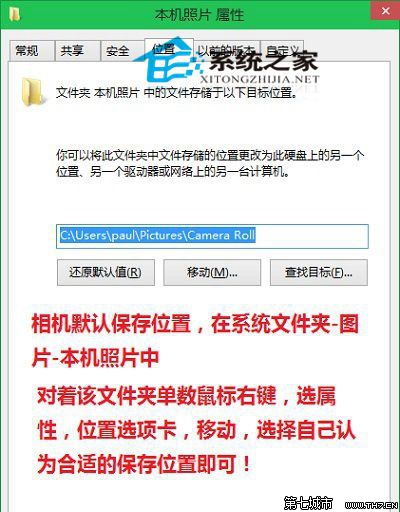
C:\Users\<用戶名>\Pictures\Camera Roll(中文顯示「圖片\本機照片」)。
C:\Users\<用戶名>\Pictures\Camera Roll
D:\CameraRoll
Win10 工作切換 (任務檢視) 使用指南:按鈕與快捷鍵
Win10 更新後開機變慢?四大優化方案加速啟動
Win10 如何修改網卡 MAC 位址 (實體位址)?三種查看與修改法
Win 10 RS2 Build 14931 快速預覽版更新內容與已知問題完整彙總
Windows 10 緊急重新開機模式使用教學:系統卡死/無回應時的安全重啟
Windows 10 升級前必看 13 大問答:免費升級資格、硬體需求、檔案保留、支援管道完整解析
Win10 無法存取 D 槽解決方案:修復磁碟權限與所有權
Win10 禁止自動更新驅動程序避免黑屏/藍屏:設備安裝設置→從不安裝 Windows Update 驅動