Windows 10 9926 預設瀏覽器仍為 IE11,但內建新一代 Edge 渲染引擎 (代號 Spartan)。透過 IE11 的實驗性功能旗標可啟用 Edge 引擎預覽。
啟用步驟
- 開啟 IE11。
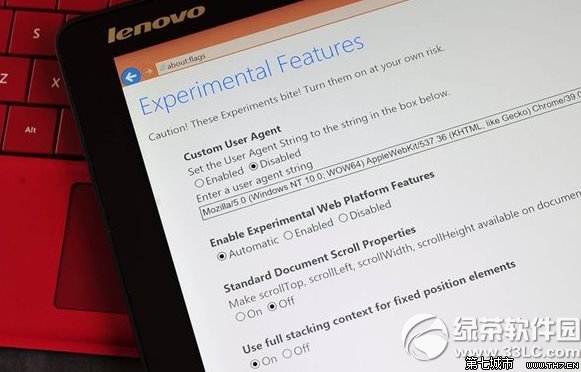
- 網址列輸入
about:flags (英式冒號) 按 Enter。
- 找到 「Enable Experimental Web Platform Features」 (啟用實驗性 Web 平台功能)。
- 將下拉選單改為 Enabled (啟用)。
- 重新啟動 IE11,即以 Edge 引擎渲染網頁。
注意事項
- 此為實驗性功能,渲染可能不穩定、相容性問題。
- 若遇問題,依相同步驟將選項改回 Disabled 即可恢復舊版 Trident 引擎。
- 獨立的 Spartan 瀏覽器 App (後命名為 Microsoft Edge) 將在後續版本正式推出。
參考來源:AnandTech 測試報告。