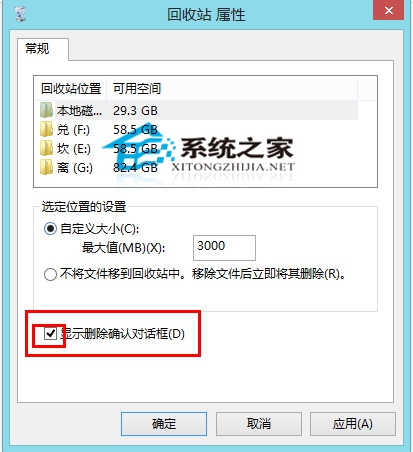
Win10 預設刪除檔案直接移至回收站不彈出確認(同 Win8)。恢復確認對話框:
回收站屬性啟用刪除確認
不常刪除檔案的使用者建議開啟,防止誤刪;頻繁刪除者可保持關閉以便操作。
Windows 10 C 碟空間暴增原因分析與解決方案 (FileRepository 資料夾)
Win 10 檔案總管空白問題修復(登錄法,含圖文)
Windows 10 正式版 ISO 下載與安裝教學:微軟官方管道取得原版映像
Win10 KB3140743 更新失敗進不了系統:安全模式移除補丁
Win10 KB3140743 累積更新安裝失敗因應對策
Win10 工作列搜尋框佔空間?一鍵隱藏/顯示 Cortana 搜尋列完整教學
Windows 10 刪除開始選單中無法移除的資料夾
Win10 升級卡 99% 藍屏無限重開?兩條路徑:回滾 Win7 或重置保留個人檔案