Windows XP Windows 7 Windows 2003 Windows Vista Windows 綜合教學 Linux 系統教學
Windows 10 Windows 8 Windows 2008 Windows NT Windows Server 電腦軟體教學

Win10 關閉 Cortana 網路搜尋提升回應速度:群組原則停用 Web 搜尋

編輯:Windows 10 系統介紹

Windows 10 Cortana 預設整合 Bing 網路搜尋,導致本地搜尋延遲。透過群組原則停用 Web 搜尋功能,可讓 Cortana 專注本地索引,回應達到「瞬時」等級。

設定步驟 (專業版以上)

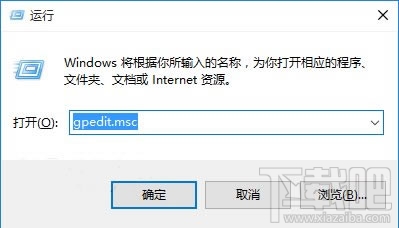
  1. Win + R → `gpedit.msc` 開啟本機群組原則編輯器。
  2. 瀏覽至:
    電腦設定 → 系統管理範本 → Windows 元件 → 搜尋
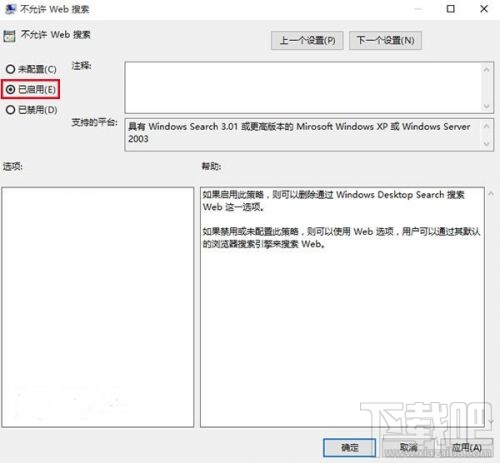
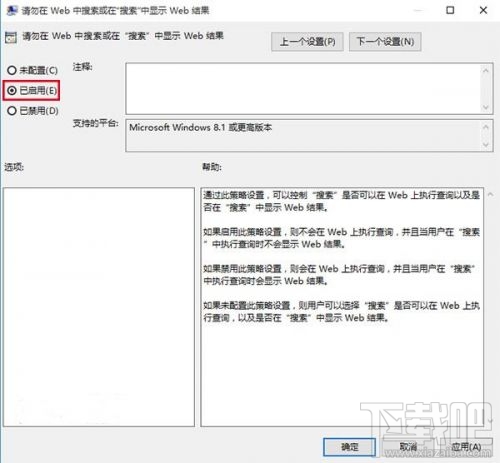
  3. 啟用以下兩項:
    • **不允許 Web 搜尋**
    • **請勿在 Web 中搜尋或在「搜尋」中顯示 Web 結果
  4. 重開機生效。

執行 gpedit.msc

搜尋群組原則路徑

啟用停用 Web 搜尋選項

效果變化

  • 搜尋列提示文字變為「Search Windows」。
  • 本地檔案/應用/設定搜尋回應極速 (毫秒級)。
  • Cortana 失去「興趣」 (新聞、天氣、股票等) 功能,因需網路。
  • 語音助手功能保留 (需麥克風權限)。

家用版替代方案

修改登錄:
HKEY_CURRENT_USER\SOFTWARE\Microsoft\Windows\CurrentVersion\Search
新建 DWORD `BingSearchEnabled` = `0`、`CortanaConsent` = `0` → 重開機。


Copyright © Windows教程網 All Rights Reserved