Windows XP Windows 7 Windows 2003 Windows Vista Windows 綜合教學 Linux 系統教學
Windows 10 Windows 8 Windows 2008 Windows NT Windows Server 電腦軟體教學

Win10 升級錯誤 0x80070002 解決:Media Creation Tool 認證失敗建議重裝正版系統,或刪除 $WINDOWS.~BT 資料夾重試

編輯:Windows 10 系統介紹

使用 Media Creation Tool 升級 Windows 10 時出現錯誤代碼 0x80070002,主要原因有二:

原因一:系統授權驗證失敗(最常見)

Media Creation Tool 偵測到目前 Windows 非正版授權(盜版、KMS 啟用、OEM 激活工具等),拒絕繼續升級流程。根本解決:重新安裝正版 Windows 7 SP1 或 Windows 8.1 Update,取得合法授權後再升級。
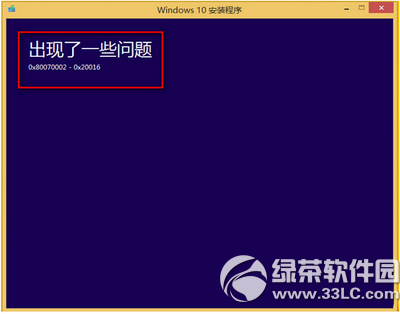
錯誤 0x80070002 示意

原因二:升級快取資料夾殘留損壞

Media Creation Tool 執行時彈出「發生了一些問題」,無具體代碼。解決:刪除系統盤根目錄 $WINDOWS.~BT 隱藏資料夾(含升級暫存檔) → 重新啟動電腦 → 再次執行 Media Creation Tool 升級。
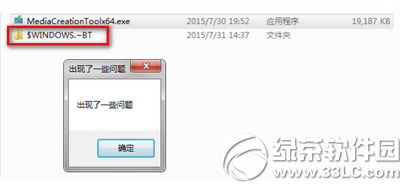
發生一些問題對話框

補充說明

  • Media Creation Tool (32 位元) 與 Media Creation Tool x64 (64 位元) 功能相同,僅對應目標系統架構。

  • $WINDOWS.~BT 為隱藏系統資料夾,需在「資料夾選項」→「檢視」→ 取消勾選「隱藏受保護的作業系統檔案」並勾選「顯示隱藏的檔案、資料夾及磁碟機」才能看見。
  • 若以上方法無效,建議直接下載官方 ISO 掛載/燒錄 USB 全新安裝,避開升級工具限制。
Copyright © Windows教程網 All Rights Reserved