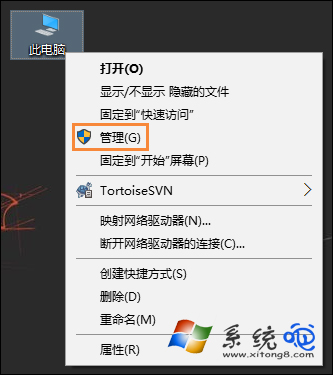
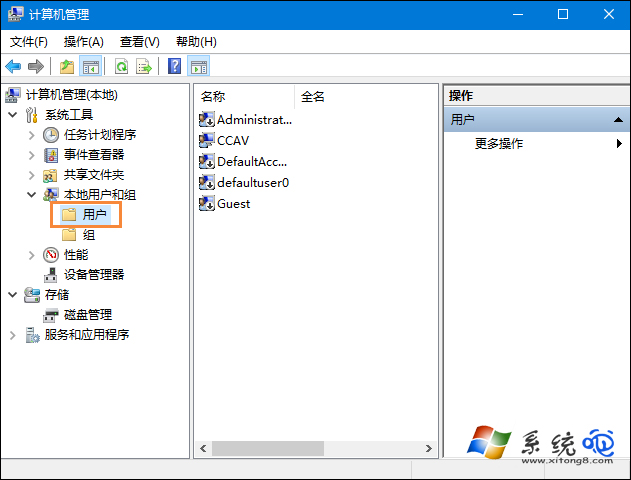
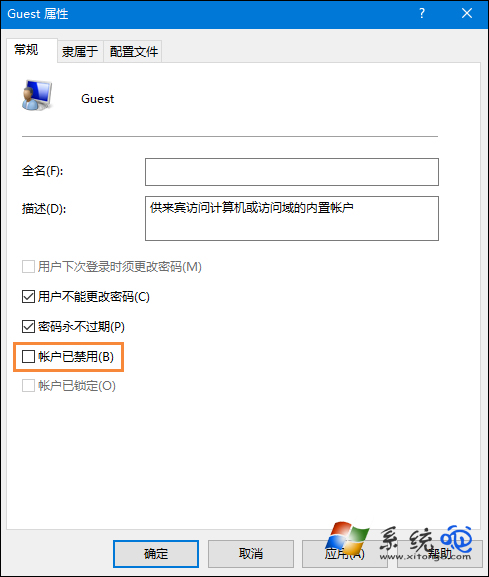
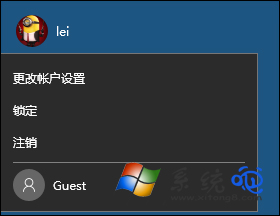
需讓他人臨時使用電腦卻不想開放自家帳號?啟用內建 Guest(來賓)帳號,權限極低,僅能上網、辦公,無法存取私人檔案與安裝軟體。
安全提醒:啟用後檢查「網路與共用中心」→「進階共用設定」,確保「來賓或公用」網路關閉檔案/印表機共用,防資料外洩。
Win10 關閉開機歡迎畫面加速開機:群組原則「登入時不顯示歡迎畫面」
Win10 提示「目前網頁的指令碼發生錯誤」?病毒/流氓軟體植入惡意 JS 腳本
Win10 預覽版如何轉正為正式版?
Win10 檔案總管實用隱藏技巧 10 選:ISO 掛載、地址列移動、路徑顯示、擴展發送到、網路地圖、核取方塊選取、快速存取工具列自訂
Win10 目錄樹輸出文字檔四大法:TREE/DIR 指令、xplorer2、自訂右鍵選單、dirhtml 輸出 HTML
Win10 Build 10537 更新內容一覽:Edge 安全性提升、UI 微調、動畫效果新增
Win10 磁碟機不顯示容量?兩種檢視模式快速切換
Win10 設置顯示器自動關閉時間:節能與護屏雙贏