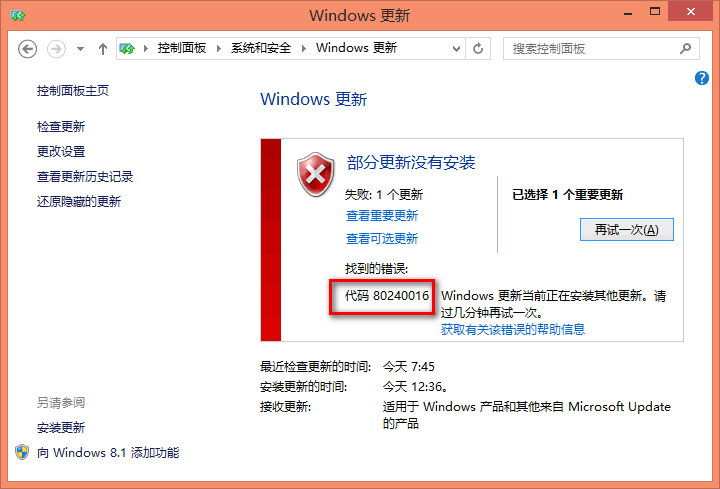
錯誤代碼 0x80240016:Windows Update 無法存取使用者權杖
此錯誤意指更新服務的權杖過期(電腦長時間未重啟)或前後台更新衝突。微軟官方建議:重啟電腦、等待其他安裝完成、或重置更新服務。
官方標準解決步驟(命令提示字元管理員)
- 關閉所有「Windows Update」/「Microsoft Update」視窗。
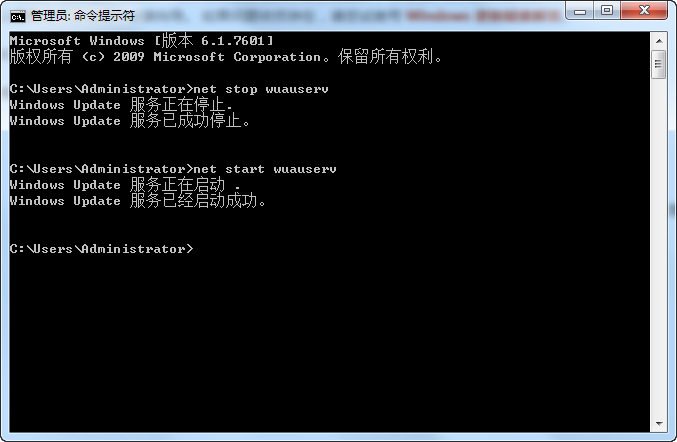
- 右鍵開始 > 命令提示字元 (系統管理員)(或 Windows PowerShell 管理員)。
- 依序輸入以下指令,每行按 Enter:
net stop wuauserv
net start wuauserv
- 輸入
exit 關閉視窗。
- 重新開啟「設定」>「更新與安全性」>「Windows Update」檢查更新。
技術解釋
- wuauserv = Windows Update 服務。
- 停止再啟動可強制服務重新向授權伺服器申請新權杖。
- 適用情境:電腦連續開機數天未重啟、背景自動更新與前景手動更新同時進行。
若仍無效
- 執行「Windows Update 疑難排解」(設定 > 更新與安全性 > 疑難排解)。
- 清理
C:\Windows\SoftwareDistribution\Download 與 DataStore 資料夾內容(需先停止 wuauserv)。
- 使用媒體建立工具離線升級。