Windows XP Windows 7 Windows 2003 Windows Vista Windows 綜合教學 Linux 系統教學
Windows 10 Windows 8 Windows 2008 Windows NT Windows Server 電腦軟體教學

Windows 10 升級報錯 0x80240020?微軟官方解釋與註冊表強制升級法

編輯:Windows 10 系統介紹

錯誤成因

代碼 0x80240020 並非升級套件損毀,而是微軟分批推送機制導致伺服器端尚未就緒。若使用技巧強行觸發升級,更易觸發此錯誤。

官方建議:耐心等待

微軟表示全球規模龐大,需分批推送,遇到此錯誤只需稍待下一輪推送即可。

進階解法:註冊表啟用升級通道

若不想等待,可手動開啟升級許可:

  1. Win+R → regedit 開啟註冊表編輯器。
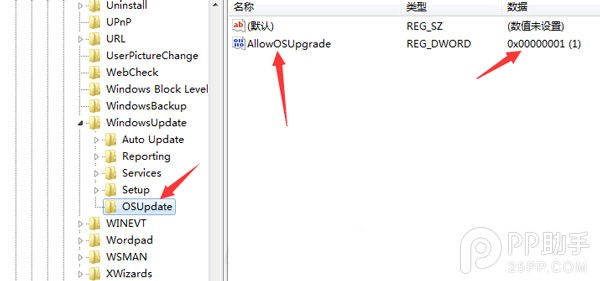
  2. 定位至 HKEY_LOCAL_MACHINE\SOFTWARE\Microsoft\Windows\CurrentVersion\WindowsUpdate\OSUpgrade(若無則新增項目)。
  3. 右鍵新增 DWORD (32-bit) 值,命名 AllowOSUpgrade,數值設為 1。
  4. 重啟電腦,開啟 Windows Update 檢查更新,即可開始下載安裝。

修改註冊表有風險,操作前建議備份或建立還原點。
Copyright © Windows教程網 All Rights Reserved