微軟於開發者中心推出「推廣碼」功能,協助開發者行銷付費應用與應用程式內購項目。
核心規則
- 每 6 個月可為單一應用/內購項目生成最多 250 組推廣碼。
- 適用平台:Windows Phone、Windows 8、Windows 10。
- 推廣碼效期:6 個月。
- 嚴禁私自販售推廣碼(違反開發者協議)。
開發者操作流程
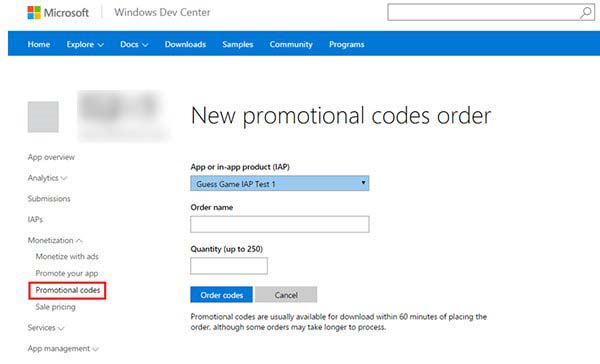
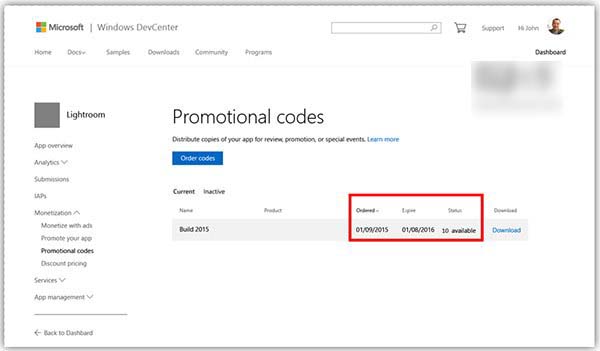
- 開發者中心 →「收益」→「推廣碼」生成介面。
- 選擇「應用」或「內購項目」,填寫碼內容與數量 →「訂購代碼」。
- 下載
.tsv 檔,內含推廣碼、過期時間、分享連結。
- 將碼或分享連結提供給使用者。
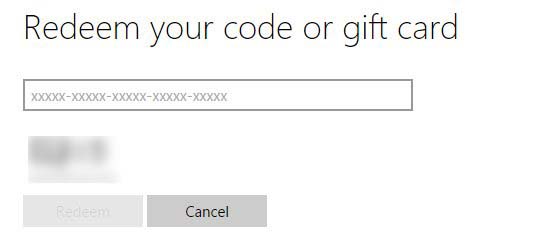
- 使用者至
microsoft.com/redeem 兌換免費取得付費內容。
- 開發者中心可追蹤兌換使用情況。
效益
協助開發者快速推廣付費應用、提升應用商店排名、獲取早期使用者回饋。