錯誤代碼 80240016 成因分析
錯誤 80240016 通常表示系統正在執行其他安裝程序,導致 Windows Update 無法繼續。常見原因包括:前一次更新未完成、安裝程序殘留在背景執行、或 Windows Update 服務狀態異常。
快速修復步驟:重新啟動 Windows Update 服務
- 關閉所有開啟的 Windows Update / Microsoft Update 視窗
- 以系統管理員身分開啟「命令提示字元」(開始功能表搜尋「cmd」→ 右鍵選擇「以系統管理員身分執行」)
- 依序輸入以下指令,每行按 Enter:
net stop wuauserv
net start wuauserv
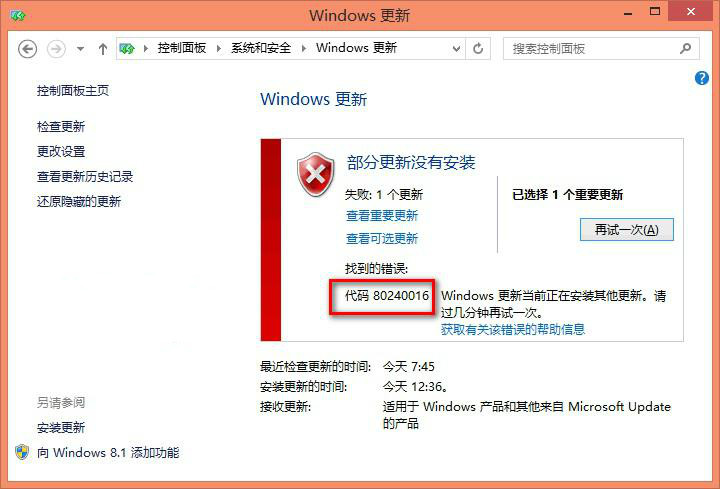
Windows Update 錯誤 80240016 畫面
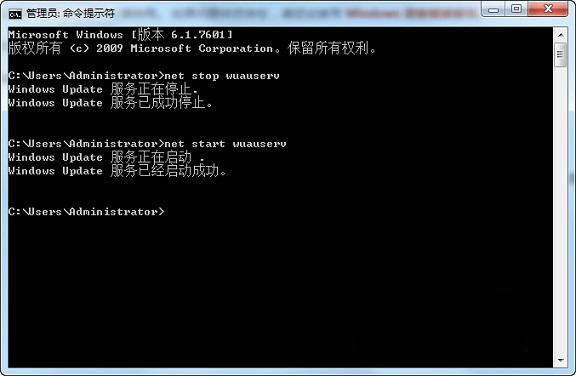
以系統管理員身分執行 net stop/start wuauserv 指令
- 關閉命令提示字元視窗(輸入
exit 或點擊右上角關閉)
- 重新開啟「Windows Update」檢查更新
進階排除建議
- 檢查通知區域是否有其他安裝程序正在執行(如軟體安裝精靈)
- 重新開機後再試一次上述步驟
- 若仍失敗,可嘗試執行
sfc /scannow 修復系統檔案
- 或使用「疑難排解」→「Windows Update」進行自動診斷
此方法同樣適用於 Windows 7/8.1 的同類錯誤代碼。