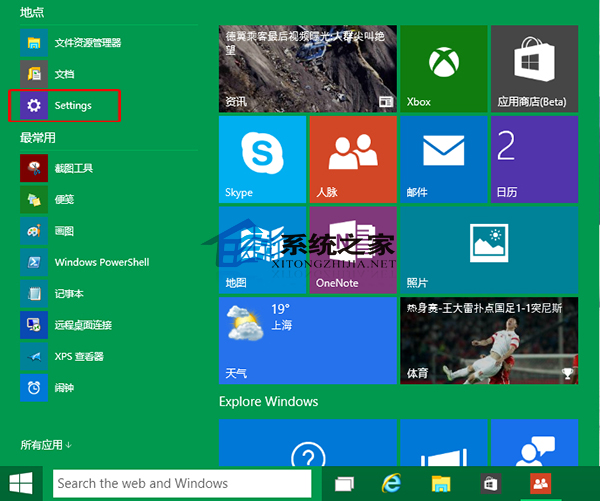
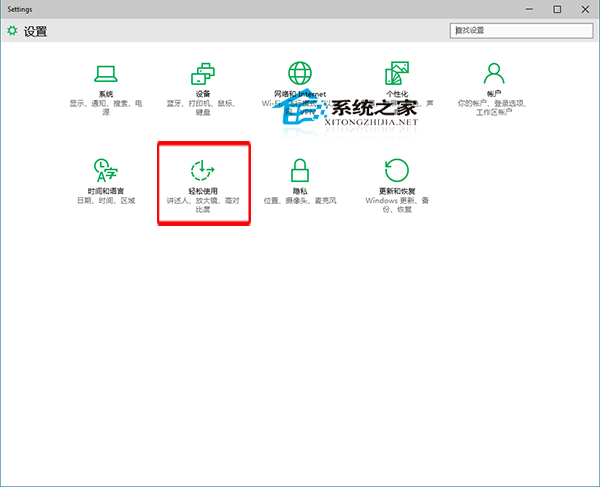
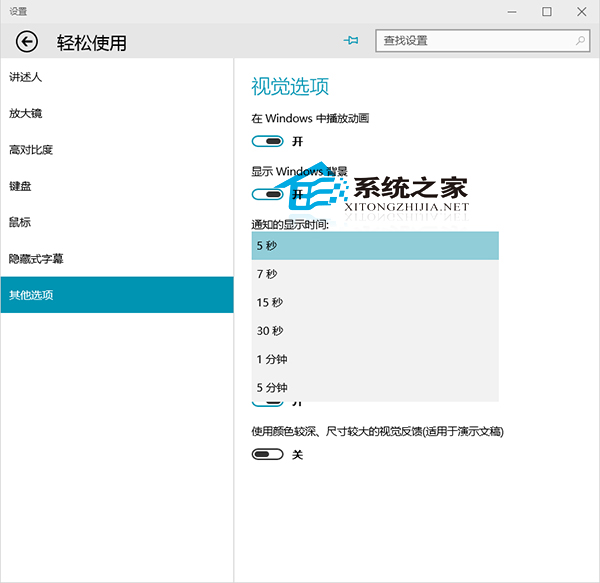
Windows 10 通知訊息預設顯示 5 秒易來不及閱讀,可自訂顯示時長:
反向需求: 想完全關閉通知彈出,可在「設定」→「系統」→「通知與動作」關閉「取得來自應用程式和其他傳送者的通知」。
Win10 怎麼看 CPU 溫度?魯大師硬體監測三步上手
Win 10 Build 14931 更新內容與已知問題彙總:USB Audio 2.0 原生支援、修復黑屏與預裝 App 故障
Windows 10 移除右下角版本水印:My_WCP_Watermark_Editor 一鍵清除,可還原
Windows 10 如何徹底關閉防火牆?控制面板三步驟完成
Win10 升級後找不到便箋?其實只是改名叫「便利貼」了
Win10 禁止插入 USB/行動硬碟自動開啟檔案總管:自動播放設定「不執行任何動作」
如何用 PowerShell 指令查看 Win10 系統關機類型(完整關機/快速啟動/休眠)
Windows 10 麥克風設定完整教學:語音辨識與小娜互動前置作業