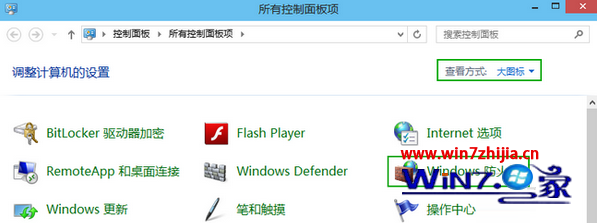
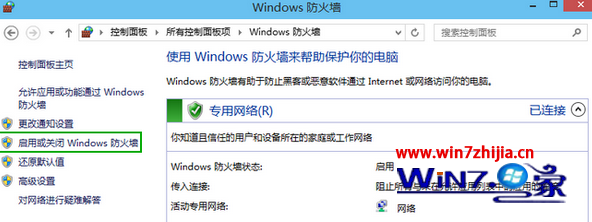
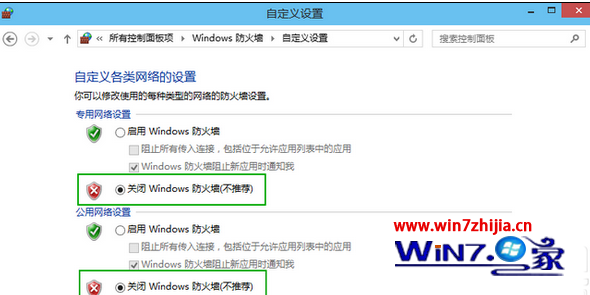
雖不建議長期關閉防火牆,但特定測試環境下可能需要暫時停用。Windows 10 關閉防火牆步驟如下:
⚠ 安全提醒:關閉防火牆會降低電腦安全性,建議僅在必要時暫時關閉,完成測試後務必重新開啟,或改為設定允許特定應用程式通過防火牆。
Win10 UWP 版 Twitter 更新 v5.2.0.0:引用轉發自推、穩定性提升
Win10 隱藏導覽列 USB 隨身碟圖示:登錄修改法
Windows 10 關閉「快速存取」近期使用檔案顯示:保護隱私一招搞定
Windows 10 程式相容性疑難排解:一鍵修復舊軟體無法運行問題
滑鼠雙擊打不開資料夾?調整「雙擊速度」拉長間隔即解
Windows 10 續航縮水、發熱嚴重?關閉背景應用程式執行權限改善筆電/平板續航力
Windows 10 開始菜單已解除安裝 Modern 應用圖示殘留清除三法
Win10 快速鍵大全:Win 鍵組合、虛擬桌面、視窗管理、截圖、游戲錄製、Cortana 一表掌握