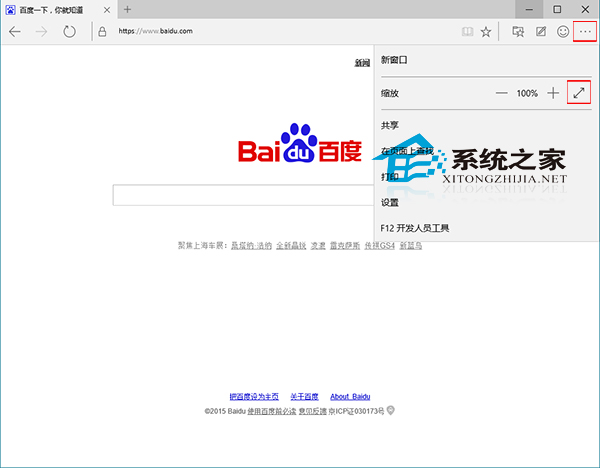
Windows 10 Spartan/Edge 瀏覽器支援全螢幕模式,隱藏工作列、分頁列、網址列,專注網頁內容:
退出全螢幕: 將滑鼠移至螢幕頂端中央,會彈出隱藏的分頁列/網址列,再次點擊「全螢幕」圖示或按 F11 鍵即可退出。
此功能適合簡報投影、閱讀長文、觀看網頁版影片等沉浸式場景。
Win10 命令提示字元 (CMD) 全螢幕模式啟用
Windows 10/8 無法進入 BIOS 解決方案:快速啟動、重新啟動與斷電大法
Win10 英文版安裝中文升級包:同 22067 修改 InstallLanguage 登錄突破語言限制
Win10 開始選單消失/無法開啟?開啟「自訂清單」三項設定立即修復
Win10 設定網路位置 (公用/私人) 方法 (第二版)
Win10 Mobile 手機如何查看系統版本號?深層選單操作圖文教學
Win10 預覽版 10041 已知問題彙總與解決方案:登入框消失、鎖定卡死、輔助工具異常、鎖畫面騎士圖示、高 DPI 文字過大、平板模式通知關閉、講述人阻擋觸控鍵盤、誤報重啟更新
Win10 快速存取取消固定資料夾操作方法