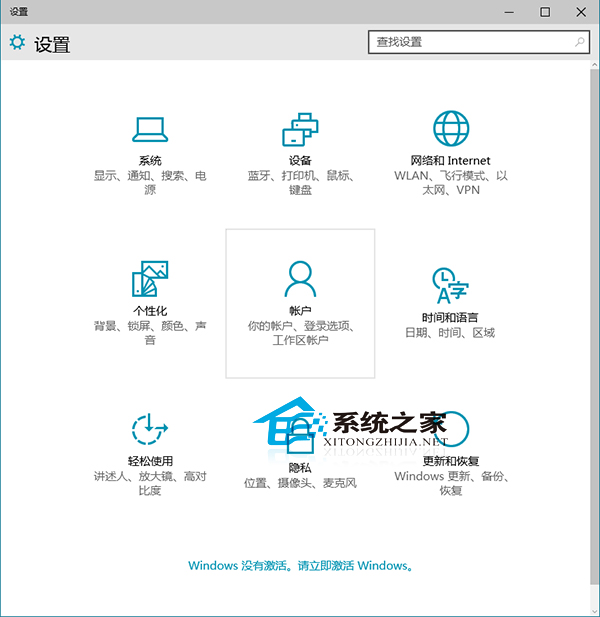
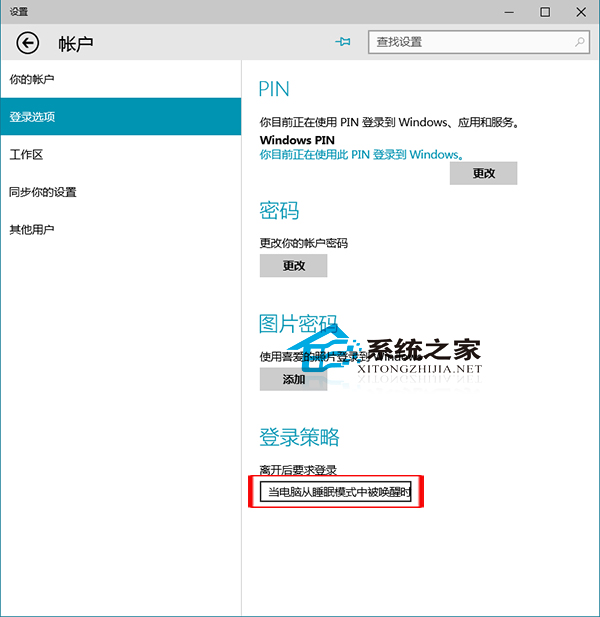
離開電腦進入睡眠模式後,喚醒時要求輸入密碼能有效防止他人竊覽資料。Windows 10 設定路徑如下:
搭配設定 PIN 碼、Windows Hello 指紋/臉部辨識,兼顧安全與便利性。
Win10 任務排程器報錯「任務物件版本不支援」?修改登錄表 command 值修復
Win10 關閉 Cortana 進程釋放記憶體:任務管理員結束工作 + 刪除 SystemApps 資料夾
Win10 開啟藍牙功能:工作列搜尋「藍牙」直達設定頁面
Win10 超級按鈕叫不出?觸控螢幕自動顯示、非觸控按 Win+C 喚出 Charms 列
Windows 10 升級報錯 0x80070006-0x2000C?乾淨啟動排除第三方衝突後再試
Win 10 如何設定長日期格式?控制台日期時間進階設定圖解
Win10 快速啟動功能無法開啟?群組原則修復讓它重新生效
Win10 部分應用程式介面模糊?相容性設定「高 DPI 時停用顯示縮放」修復