Windows XP Windows 7 Windows 2003 Windows Vista Windows 綜合教學 Linux 系統教學
Windows 10 Windows 8 Windows 2008 Windows NT Windows Server 電腦軟體教學

Win10 任務排程器報錯「任務物件版本不支援」?修改登錄表 command 值修復

編輯:Windows 10 系統介紹

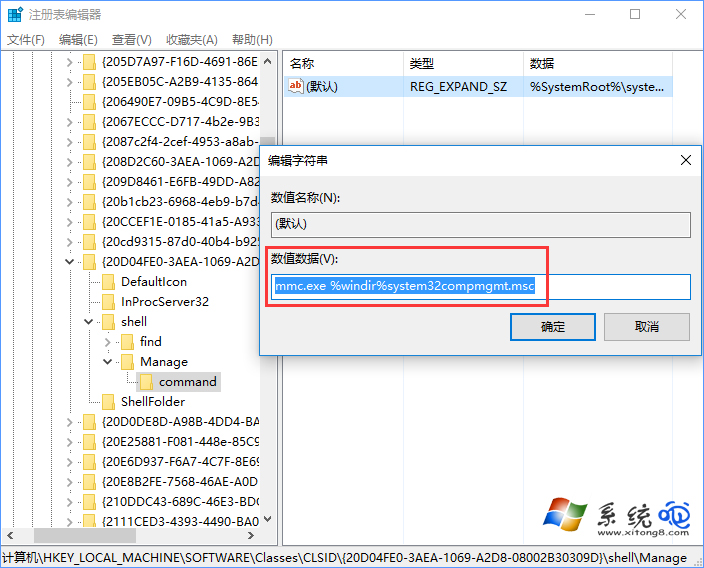
開啟任務排程器彈出「任務物件版本不支援或無效」,通常是登錄表 HKEY_LOCAL_MACHINE\SOFTWARE\Classes\CLSID\{20D04FE0-3AEA-1069-A2D8-08002B30309D}\shell\Manage\command 預設值被修改。將其改回 mmc.exe %windir%\system32\compmgmt.msc 即可。

修復步驟

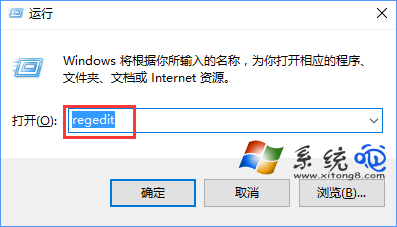
  1. Win+R → regedit。
  2. 定位至上述路徑。
  3. 雙擊「預設」值,修改數值資料為 mmc.exe %windir%\system32\compmgmt.msc → 確定。
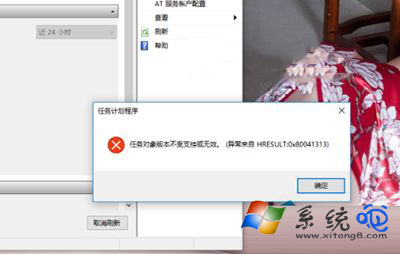
錯誤提示
登錄編輯器路徑
修改 command 值

備註:若修改後仍報錯,可能為系統檔案損壞,嘗試 sfc /scannow 或就地升級修復;極端情況下需重裝系統。

Copyright © Windows教程網 All Rights Reserved