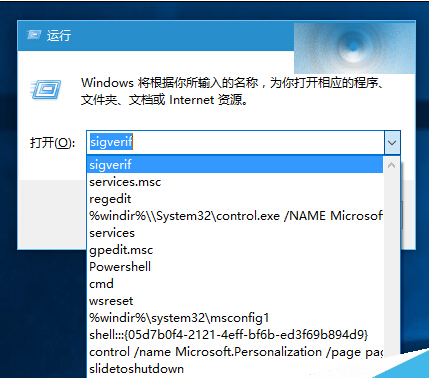
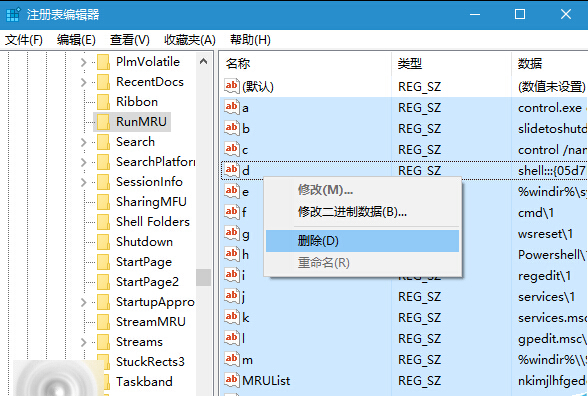
「執行」 (Win+R) 歷史記錄洩露隱私?註冊表刪除 RunMRU 鍵值即可清除,軟媒魔方清理大師支援備份/一鍵恢復。
RunMRU
regedit
HKEY_CURRENT_USER\Software\Microsoft\Windows\CurrentVersion\Explorer\RunMRU
(預設)
刪除後「執行」下拉選單即無歷史記錄。微軟未來版本可能在設定中內建清除功能,目前仍需註冊表操作。
Win10 切換觸控鍵盤與螢幕鍵盤:雙模輸入法適用不同場景
Windows 10 修改網卡 MAC 位址:三種查詢方式與裝置管理器修改法
關閉 Win 10 開始功能表「最近開啟的程式」顯示,保護隱私
Win10 如何關閉「新通知」並隱藏動作中心圖示?
Win10 KB3116869 累積更新安裝黑屏?清理快取跳過該補丁重新下載
Win10 控制台在哪?兩條最快路徑直達
Win10 解決寬帶撥號後自動開啟 Bing 網頁:群組原則關閉 NCSI 活動測試
Windows 10 設定螢幕保護程式教學 (含 3D 管道、相片、字幕等內建項目)