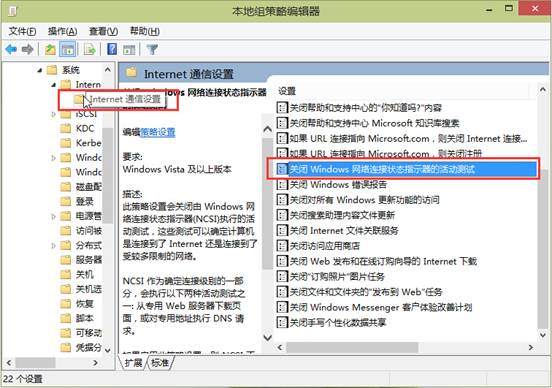
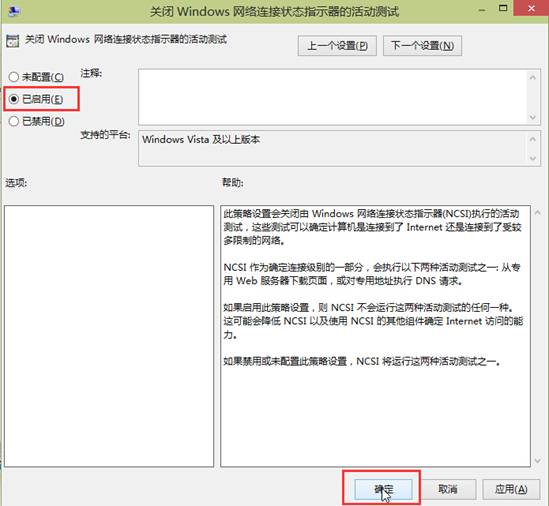
Win10 撥號連線後自動彈開 Bing 網頁,因網路連線狀態指示器 (NCSI) 活動測試導致,關閉方法:
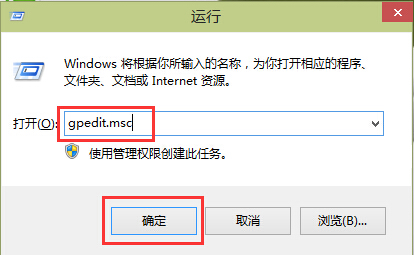
gpedit.msc
設定生效後撥號不再自動開啟網頁,淨化上網體驗。
Win10 變更 Edge 瀏覽器預設搜尋引擎教學 (以 Google 為例)
Win10 執行系統效能評分:命令列啟動 WinSAT 正式評估
Win10 任務列音量圖標消失?教你幾步找回小喇叭
巧用 WinPE 開機碟破解/清除 Windows 10 開機密碼 (NTPWEdit 原理工具)
Win10 如何關閉自動定位功能?保護隱私防止位置追蹤
Win10 無法安裝 Visual Studio?避免預裝運行庫與移除內建應用,或重置系統後優先安裝
Win10 郵件應用程式變更背景圖片教學
Win10 禁止 PDF 使用 Edge (Spartan) 開啟,改用慣用閱讀器