Windows XP Windows 7 Windows 2003 Windows Vista Windows 綜合教學 Linux 系統教學
Windows 10 Windows 8 Windows 2008 Windows NT Windows Server 電腦軟體教學

Win10 右鍵選單新增「加密」功能,一鍵加密/解密檔案資料夾

編輯:Windows 10 系統介紹

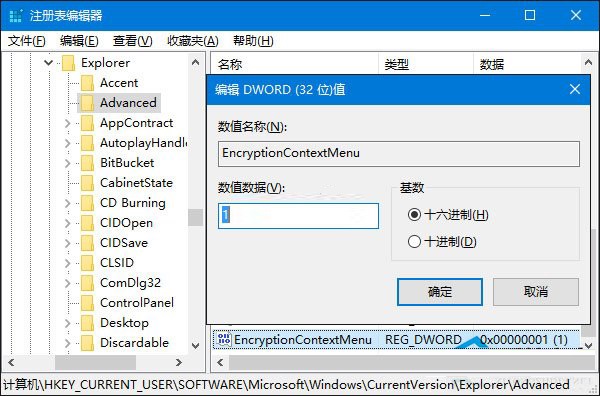
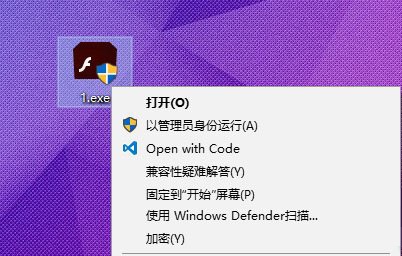
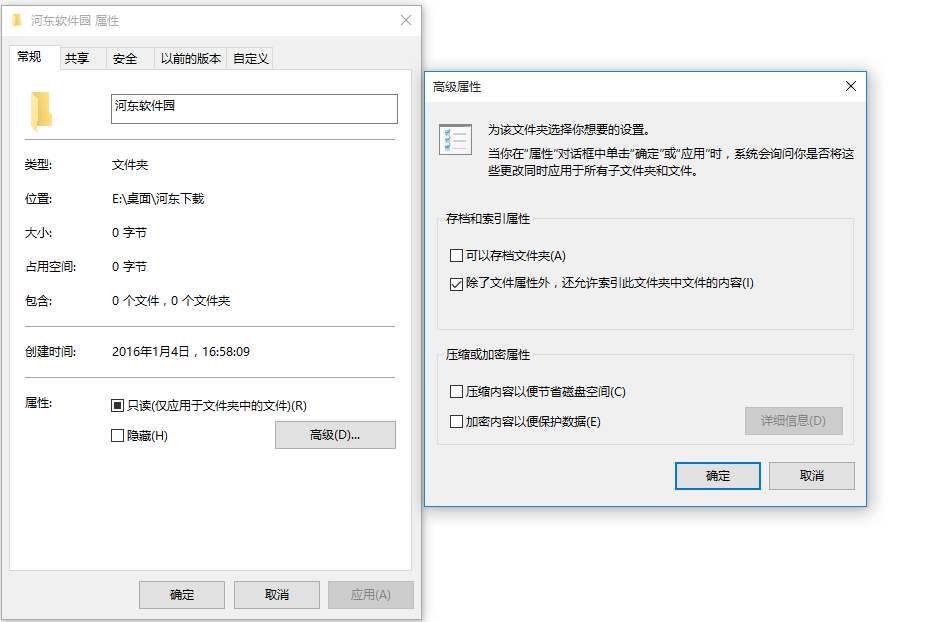
Win10 內建 EFS 加密功能,但需進入屬性 → 進階 → 勾選加密,步驟繁瑣。透過註冊表新增 EncryptionContextMenu,右鍵選單直接顯示「加密」/「解密」,大幅提升效率。
操作步驟

  1. Win+R → regedit。
  2. 瀏覽至:
    HKEY_CURRENT_USER\Software\Microsoft\Windows\CurrentVersion\Explorer\Advanced
  3. 右側新增 DWORD (32-bit) 值:EncryptionContextMenu,數值設為 1。

  1. 無需重開機,任意檔案/資料夾右鍵即見「加密」(已加密顯示「解密」)。

移除方法

刪除 EncryptionContextMenu 鍵值即可。

注意:EFS 加密僅支援 NTFS 磁碟,重裝系統後需匯出憑證才能解密,請妥善備份加密憑證。

Copyright © Windows教程網 All Rights Reserved