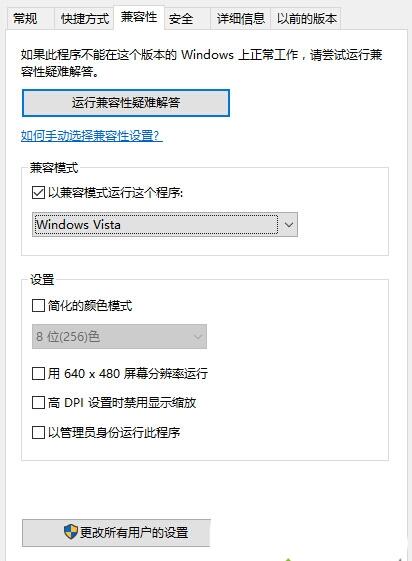
MATLAB 7.0 在 Win10 執行出現 Runtime Error,設定相容模式即可:
Win10 遇舊軟體報錯,優先嘗試相容模式 + 管理員權限,多數可解決。
Windows 10 提示「裝置處於離線狀態」無法登入:Microsoft 帳戶需聯網驗證、改用本地帳戶密碼解決
Mac 安裝 Windows 10 完整教程:Boot Camp 製作啟動盤與分區安裝
Win10 開機卡在登入畫面?安全模式卸載近期軟體/驅動或重置系統
Win10 筆電開啟行動熱點 (虛擬 WiFi) 完整教學:手機平板共享上網
Win10 無法辨識 USB 裝置三大解決方案
Windows 10 Mobile Build 10166 更新內容與模擬器截圖:來電控制、Edge 本地主機、鎖屏通知
Win10 平板邊緣滑動手勢全攻略:開啟/關閉操作中心、工作檢視、標題列、任務列
Win10 桌面圖示全部消失怎麼找回?兩招解決:顯示桌面圖示與重啟檔案總管