應用商店下載的應用、更新檔預設存放於 C:\Windows\SoftwareDistribution\Download,久而久之佔據大量 C 槽空間。本文教您如何辨識並安全刪除這些暫存檔。
C:\Windows\SoftwareDistribution\Download
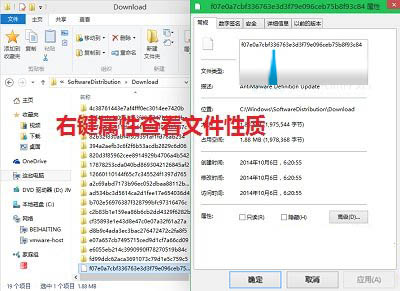
建議:定期清理此資料夾,或等待正式版內建清理功能。切勿刪除進行中更新的暫存檔。
Win10 藍屏不顯示錯誤代碼怎麼辦?註冊表啟用 DisplayParameters 顯示完整藍屏資訊
Windows 10 命令提示字元(CMD)重大改進:支援複製貼上、視窗最大化、自動換行與透明度調整
Windows 10 應用商店緩存清理指令:wsreset 一鍵搞定
Win10 切換平板/桌面模式:手動開關與自動偵測 (Continuum) 完整說明
Windows 10 技術預覽版完整安裝教學:升級、雙系統、USB 安裝三大法
Win10 技巧:將「執行」釘選至開始選單 — CLSID/GUID 建立捷徑法