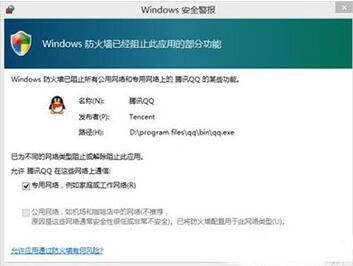
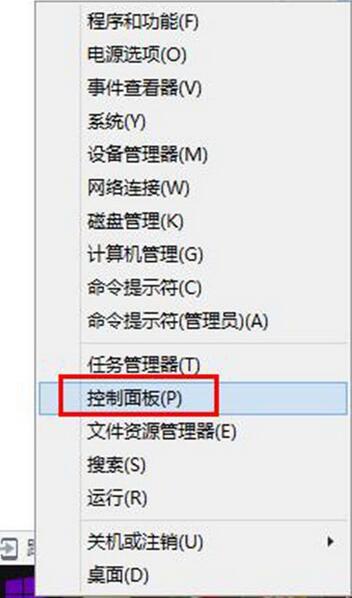
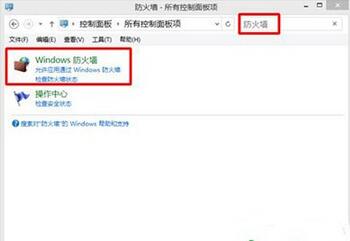
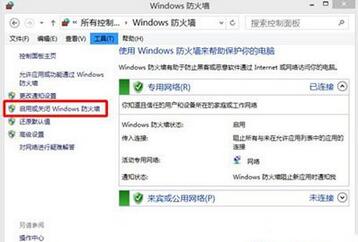
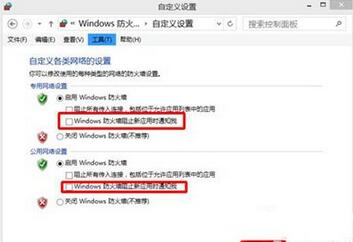
本文內容與 ID 21433 重複,解決方案相同:控制台 → Windows Defender 防火牆 → 啟用或關閉防火牆 → 取消勾選「防火牆阻止應用程式時通知我」即可徹底停用彈窗。
請參閱 ID 21433「Win10 關閉 Windows 安全性警示彈窗」 獲取詳細步驟說明與補充建議。
Win10 全螢幕看影片任務列一直彈出?重新啟動 Windows 檔案總管秒解決
Win10 TP 預覽版切換回開始畫面 (停用開始選單)
Win10 10125 中文語言包安裝教學與亂碼解決:lpksetup 安裝、設定預設語言、變更系統地區、複製設定至歡迎畫面
Windows 10 寬帶連線錯誤 691 完整排查:帳號密碼、硬體、欠費、綁定、並發登入八大原因與對策
Win10 1511 (TH2) 更新後藍屏?收集 DMP 檔案精準診斷錯誤代碼
Win10 升級失敗三大主因與對策:硬碟衝突、服務干擾、防毒攔截
Win10 系統當機無回應?「緊急重新開機」比強制關機更安全
升級 Windows 10 後藍屏/無限重啟?多為顯卡驅動衝突,安全模式卸載驅動即可解決