Windows XP Windows 7 Windows 2003 Windows Vista Windows 綜合教學 Linux 系統教學
Windows 10 Windows 8 Windows 2008 Windows NT Windows Server 電腦軟體教學

Microsoft Edge 啟用 TCP Fast Open 加速網頁載入:about:flags 實驗性功能設定

編輯:Windows 10 系統介紹

TCP Fast Open (TFO) 可減少 TCP 三向交握延遲,Google 實測可提升網頁載入 10%-40%。Microsoft Edge 以實驗性功能支援 TFO,簡單三步驟即可啟用。

什麼是 TCP Fast Open?

TFO 允許在 TCP SYN 封包中攜帶資料,省去一個 RTT (往返時間)。包含加密 Cookie 機制防止攔截攻擊,Linux 核心 3.7+、Windows 10 1607+ 原生支援,需伺服器端同啟用才生效。

Edge 啟用步驟

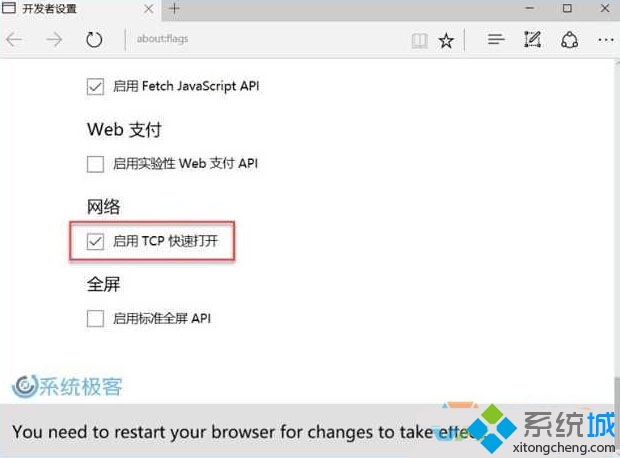
  1. 網址列輸入 about:flags → Enter。
  2. 尋找「網路」區塊 → 勾選「啟用 TCP 快速開啟」。
  3. 完全關閉 Edge 重新開啟生效。

Edge about:flags 啟用 TCP Fast Open

注意:實驗性功能可能導致特定網站相容性問題 (如舊版 Proxy、防火牆攔截 SYN-data),遇異常請取消勾選。系統層面 TFO 狀態可用 PowerShell 查詢:Get-NetTCPSetting | Select SettingName, TcpFastOpen。

Copyright © Windows教程網 All Rights Reserved