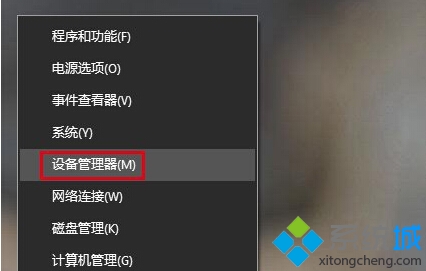
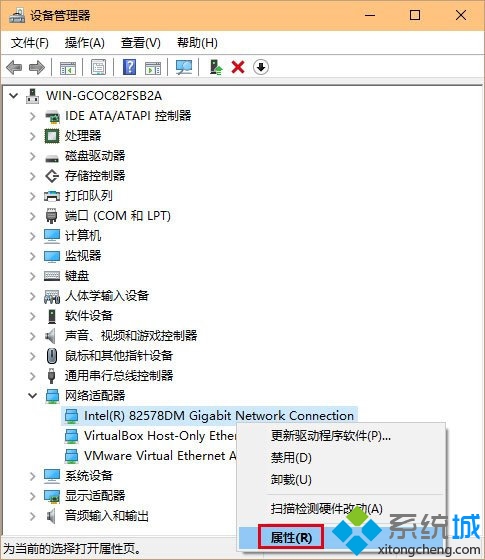
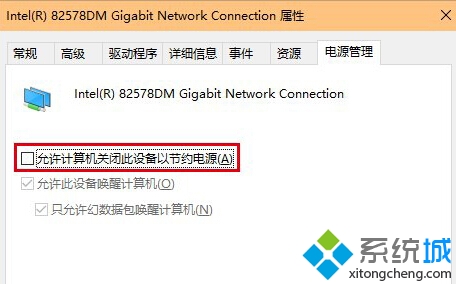
Win10 網路間歇性斷線,主因是網卡省電模式。透過裝置管理員關閉即可解決。
此設定對無線網卡、乙太網卡皆有效。若問題持續,請更新驅動或檢查路由器設定。
Win10 自訂檔案總管開啟預設頁面:使用捷徑取代預設「常用資料夾」
Windows 10 應用程式商店快取清理指令:wsreset 一鍵重置
Win 10 禁用驅動程式強制簽名完整教學(含圖文)
Win10 改回 Win7 經典工作管理器(IFEO 映像檔執行選項法)
Win10 開機音樂不見了?同 22014 解決方案
Win10 找回工作列「檔案總管」圖示:搜尋拖曳法
Win10 9888 升級/安裝方式總覽:ISO 掛載/U盤/硬盤/VHD/軟媒工具多路徑可選
Win10 磁碟管理「刪除磁碟區」灰色無法點擊?移除分頁檔案後再操作