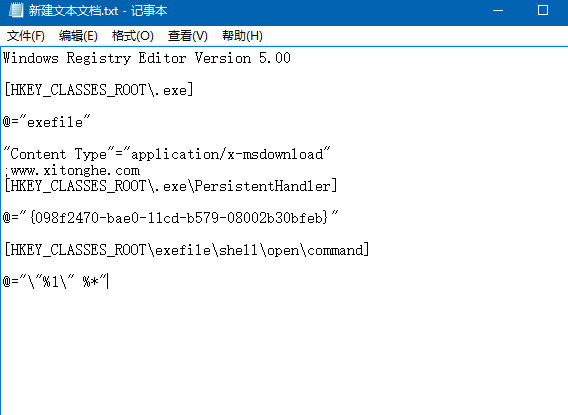
Windows 10 .exe 檔案雙擊無法開啟 (關聯損壞),可建立 .reg 註冊表檔案修復關聯:新建文字文件貼上註冊表代碼 → 另存為 修復exe關聯.reg (編碼 UTF-8) → 雙擊導入確認即可恢復 .exe 執行關聯。
HKEY_CLASSES_ROOT\.exe、HKEY_CLASSES_ROOT\exefile\shell\open\command 等鍵值)。修復exe關聯.reg、存檔類型「所有檔案」、編碼「UTF-8」 → 儲存。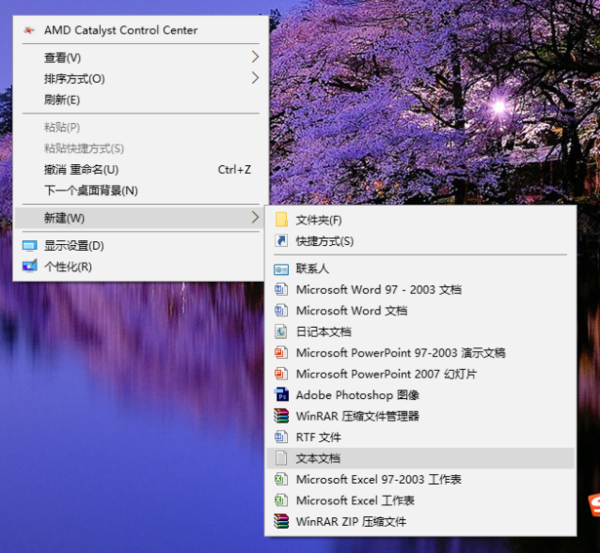

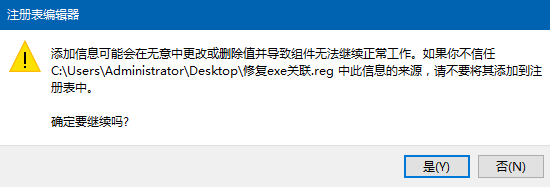
導入後 .exe 檔案關聯即刻恢復,可正常執行程式。
Win10 徹底關閉操作中心通知:登錄表新增 DisableNotificationCenter=1 一鍵靜音
Win10 「登入選項」無法開啟?啟用 Credential Manager 與 Windows Biometric Service 服務
Win10 桌面捷徑「目標」欄位灰色無法編輯?重建真實捷徑即可修復
Windows 10 如何登出/切換使用者?開始選單兩步驟完成
Windows 10 IE 瀏覽器如何封鎖網站彈出視窗?網際網路選項啟用攔截器
Windows 10 啟用 Cortana (小娜) 語音助手教學:變更地區/語言為美國英文、登入 Microsoft 帳號、開啟「嘿 Cortana」