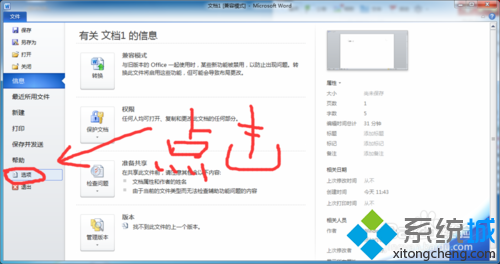
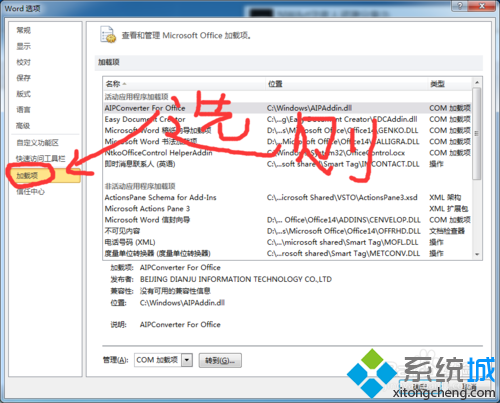
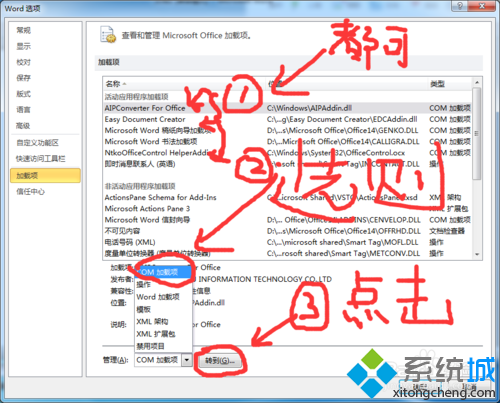
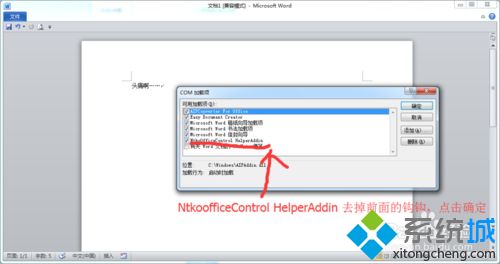
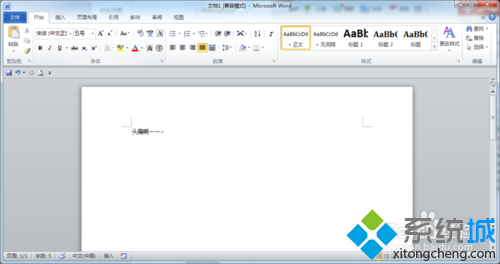
Windows 10 下 Office 2010 Word 僅剩「檔案」選單,其他選單消失,主因是 NtkoOfficeControl Helper 增益集衝突。停用即可恢復。
NtkoOfficeControl Helper Addin
此為第三方增益集相容性問題,停用後不影響 Word 核心功能。
Win10 更新 Realtek HD Audio 驅動失敗?同 22063 關閉 UAC 解決
Win10 使用者帳戶控制 (UAC) 彈窗太煩?調整安全性層級至最低或透過 msconfig 關閉
Win10 移除桌面捷徑小箭頭:360 安全衛士/軟媒魔方一鍵美化
Win10 命令提示字元全螢幕顯示:Alt+Enter 快速切換
Windows 10 緊急重啟功能使用方法:Ctrl+Alt+Del + 電源鍵組合
Win10 任務列位置圖示 (定位服務提示):自動顯示/隱藏,點擊直達隱私權設定管理權限
Win10 如何關閉自動更新?透過計費連線限制更新下載
Win10/8/7 修改「新增資料夾」預設命名規則:註冊表自訂前綴/格式