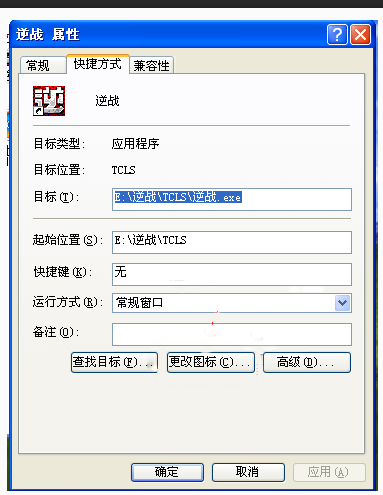
Win 10 玩《逆戰》黑屏,設定相容性修復:
client.exe
以 Win 7 相容模式執行即可解決黑屏問題,其他舊遊戲同理可試。
Windows 10 版本太多怎麼選?五大使用場景對照表一次看懂
Win10 忘記登入密碼:系統安裝媒體 + 登錄表離線掛載 cmdline=cmd.exe + SetupType=2 重設密碼 (僅本地帳號)
Win10 應用商店下載程式儲存位置在哪?顯示隱藏 WindowsApps 資料夾查看
Win10 設定「此電腦」為預設開啟位置的完整教學
Windows 10 安全性與維護功能使用教學 (自動維護、應用程式管理)
Win 10 高解析度螢幕 DPI 縮放導致字體模糊?註冊表修改與 DPI Fix 工具雙解法
Win10 快速存取排序自訂:拖曳調整資料夾順序同步左右窗格
Win10 10122 建立本機帳號的兩個隱藏技巧