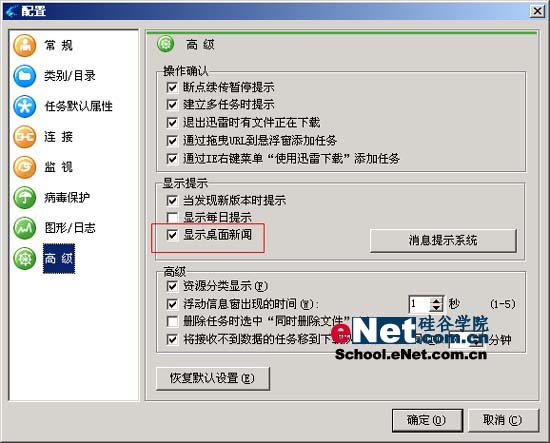
新版迅雷預設啟用桌面新聞推送,每次啟動都彈出廣告窗口,體驗極差。一個設定即可永久關閉。
微信牆是什麼?企業活動引流神器設置教學(搖一搖大屏互動)
Outlook Express 郵件與通訊錄遷移至非系統盤:重灌系統也能秒回復
代理伺服器深入淺出:原理、搜尋、設定、SocksCap 通用代理與二級代理
Outlook 郵件圖片無法顯示?註冊表 OutlookSecureTempFolder 路徑失效修復指南
微信如何使用嘀嘀打車?錢包→銀行卡→嘀嘀打車入口完整流程
Firefox 因 Flash Player 沙箱機制卡頓/崩潰?修改 mms.cfg 禁用 ProtectedMode 解決
搜狗瀏覽器「相關推薦」導航條永久關閉教學:工具箱 → 搜狗推薦 → 右鍵卸載
易信電話留言使用教學:好友無需安裝 App 也能收聽語音