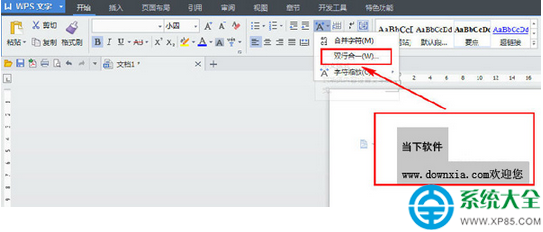
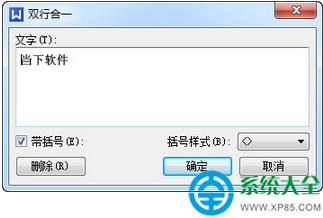
WPS 遇到需將文字合併為雙行排版時,使用「雙行合一」功能即可,操作簡單三步走。
WPS Office 官方最新版下載:https://www.xp85.com/html/wpsofficegfzxb.html
iTunes 更新後無法連接伺服器?五大解決方法完整匯總
打印機共享疑難雜症全攻略:服務、權限、驅動、網絡層層排查
支付寶芝麻信用分提升指南:解讀評分維度,解鎖免押租房、借呗額度等專屬權益
WPS 2016 輸入平方公尺符號(m²):字體上標與快捷鍵雙法
.xlsx 文件打不開?三種方案徹底解決 Office 版本兼容難題
微軟如何破解 Win10 應用匱乏困局:跨平台開發工具戰略深度解析
如何更換電腦滑鼠指標?Win7 系統自訂指標圖文教程
iPhone 設定通話轉移完整教學:三步驟輕鬆搞定