在 Shell 腳本中為輸出訊息加上顏色,能清楚區分資訊、警告、錯誤等層級,大幅提升可讀性。本文提供一個通用的 echocolor 函式,支援 8 種基本顏色,並附使用範例。
echocolor() {
    local color=$1
    shift
    case $color in
        black)  echo -e "\e[0;30m$@\e[0m" ;;
        red)    echo -e "\e[0;31m$@\e[0m" ;;
        green)  echo -e "\e[0;32m$@\e[0m" ;;
        yellow) echo -e "\e[0;33m$@\e[0m" ;;
        blue)   echo -e "\e[0;34m$@\e[0m" ;;
        purple) echo -e "\e[0;35m$@\e[0m" ;;
        cyan)   echo -e "\e[0;36m$@\e[0m" ;;
        *)      echo -e "\e[0;37m$@\e[0m" ;;
    esac
}cd "$(dirname "$(readlink -f "${0}")")"
echocolor purple ">> 當前目錄:${PWD}"
modname=$(grep 'obj-m' Makefile | awk '{print $3}') && modname=${modname/.o}
echocolor purple ">> 模組名稱:${modname}"
echocolor yellow ">> 卸載舊模組.."
adb shell rmmod ${modname}
echocolor yellow ">> 編譯中.."
make
echocolor yellow ">> 上傳檔案.."
adb push k860_words_count.ko /tmp/
echocolor yellow ">> 安裝模組.."
adb shell insmod /tmp/k860_words_count.ko
echocolor cyan ">> 輸出除錯訊息.."
adb shell cat /proc/kmsg | grep word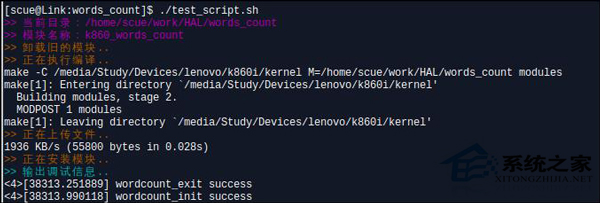
將函式放入 ~/.bashrc 或腳本開頭即可重複使用,讓終端機輸出更具辨識度。
Linux tar 命令完整實戰指南:打包、壓縮、排除與目錄切換
Linux 使用 iptables 實現僅允許國內 IP 存取防禦策略
Linux xinetd 服務啟動失敗「unrecognized service」?一鍵安裝修復指南
Linux top 指令進階使用教學:參數詳解、互動式快捷鍵 (P/M/N/T/k/r/q)、批次模式輸出檔案、指定 PID 監控、效能分析實戰
Linux 因 glibc 損壞導致 Kernel Panic 修復實戰:救援模式重裝核心庫
Linux 掛載 LVM 邏輯卷完整指南:從 PV/VG/LV 掃描到正確掛載