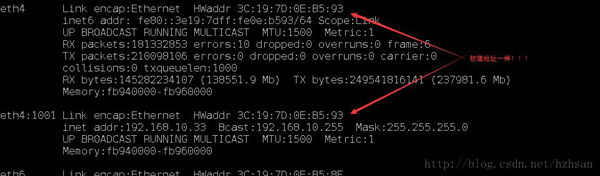
單一實體網卡可建立多張虛擬網卡,各自擁有獨立 IP,適用於伺服器多 IP 需求或測試環境。
sudo ifconfig eth0:0 192.168.10.10 up   # 建立
sudo ifconfig eth0:0 down                # 移除
注意:虛擬網卡 MAC 位址與實體網卡相同。
Ubuntu 編輯 /etc/network/interfaces:
auto eth0:0
iface eth0:0 inet static
address 192.168.10.10
netmask 255.255.255.0
# network 192.168.10.1
# broadcast 192.168.1.255套用變更:sudo /etc/init.d/networking restart
# 安裝工具
sudo apt-get install uml-utilities bridge-utils

# 建立 TAP
sudo tunctl -b -u $(whoami)   # 產生 tap0, tap1...

# 啟用 TAP
sudo ip link set tap0 up

# 建立網橋並加入 TAP
sudo brctl addbr br0
sudo ip link set br0 up
sudo brctl addif br0 tap0

# 設定網橋 IP
sudo ifconfig br0 192.168.100.1/24 up
TAP 裝置擁有獨立 MAC 位址,適合 KVM/QEMU 虛擬機網路。
臨時測試用方法一;長期服務用方法二;需獨立 MAC 或給虛擬機用則用方法三。