Windows XP Windows 7 Windows 2003 Windows Vista Windows 綜合教學 Linux 系統教學
Windows 10 Windows 8 Windows 2008 Windows NT Windows Server 電腦軟體教學

找回被微軟捨棄的雙使用者同時登入:替換 SP2 Beta 版 termsrv.dll 實現多工登入

編輯:XP 系統基礎知識

編輯提醒:此技巧源自 SP2 2055 Beta 版特性,正式版已移除,可能存在不穩定或安全風險。僅供技術交流,實作前請完整備份系統,風險自負。

SP2 早期 Beta 版(Build 2055)曾支援兩位使用者同時遠端登入(類終端機服務),但正式版移除此功能。若需找回,可透過替換系統檔 termsrv.dll 實現。

操作步驟

  1. 確認「Terminal Services」服務已停用(控制台→系統管理工具→電腦管理→服務)。
  2. 備份 C:\Windows\System32\dllcache\termsrv.dll。
  3. 刪除 C:\Windows\System32\termsrv.dll 及 C:\Windows\System32\dllcache\termsrv.dll。
  4. 取得 SP2 2055 版 termsrv.dll(需自行尋找),複製至 C:\Windows\System32\dllcache。
  5. 同樣複製至 C:\Windows\System32。
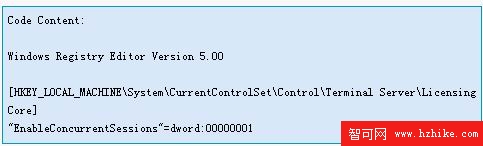
  6. 匯入以下登錄機碼(以啟用多工登入):
    登錄機碼設定
  7. 啟動「Terminal Services」服務。

完成後系統即允許兩位使用者同時登入(一位本機、一位遠端)。請謹慎評估風險後再執行。

Copyright © Windows教程網 All Rights Reserved