先裝XP再裝Vista是標準雙系統順序。若後因重裝XP導致Vista啟動項消失(XP的NTLDR覆蓋了Vista的BCD啟動管理器),需用Vista安裝光碟進入修復環境手動重建BCD並加入XP項目。
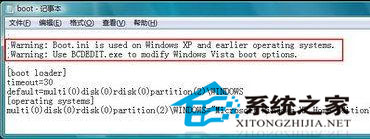
bootsect -nt60 allbootrec /RebuildBcdbootrec不偵測XP):bcdedit /create {ntldr} /d "早期版本的 Windows"
bcdedit /set {ntldr} device partition=C:
bcdedit /set {ntldr} path \ntldr
bcdedit /displayorder {ntldr} /addlast
{ntldr}:標識符,指定NTLDR啟動器。partition=C::NTLDR所在活動分區,請依實際調整。/addlast:將XP項目置於啟動選單末尾。Vista以降採用BCD資料庫取代boot.ini,XP的NTLDR無法啟動Vista。修復核心在於先恢復Vista啟動管理器(bootsect),再手動將XP掛載到BCD。操作雖繁但成功率遠高於第三方工具。