Windows XP Windows 7 Windows 2003 Windows Vista Windows 綜合教學 Linux 系統教學
Windows 10 Windows 8 Windows 2008 Windows NT Windows Server 電腦軟體教學

WinXP 右鍵選單加入「管理員取得所有權」:導入註冊檔與 takeown.exe 實現

編輯:XP 系統應用技巧

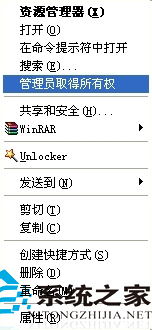
Win7 右鍵有「以系統管理員身分執行」,XP 預設無此功能。下載元件包 (含 takeown.exe 及 添加管理員取得所有權右鍵選單.reg),將 takeown.exe 複製至 C:\Windows\System32,雙擊導入 .reg 檔,即可在右鍵選單獲得「管理員取得所有權」選項,快速取得檔案/資料夾完整控制權。

操作步驟

  1. 下載附件元件包解壓縮。
  2. 將 takeown.exe 複製到 C:\Windows\System32。
  3. 雙擊 添加管理員取得所有權右鍵選單.reg 匯入登錄檔。
  4. 右鍵任意檔案/資料夾即可看到新選項,點選後以目前管理員身分取得所有權與完全控制權限。

適用於需頻繁修改系統檔案、移除頑固資料夾的進階使用者。

Copyright © Windows教程網 All Rights Reserved