Windows XP Windows 7 Windows 2003 Windows Vista Windows 綜合教學 Linux 系統教學
Windows 10 Windows 8 Windows 2008 Windows NT Windows Server 電腦軟體教學

Windows XP 偵測到鍵盤驅動程式不相容?註冊表匯出 Keyboard Layouts 機碼重匯入秒解

編輯:XP 系統應用技巧

點選語言列設定彈出「偵測到不相容的鍵盤驅動程式」。主因 HKEY_LOCAL_MACHINE\SYSTEM\CurrentControlSet\Control\Keyboard Layouts 機碼損毀/權限異常。解法:註冊表編輯器定位該機碼 → 右鍵「匯出」備份 → 雙擊備份檔匯入 → 確認 → 重開機/重新登入即解決。

操作步驟

  1. 「開始」→「執行」→ regedit。
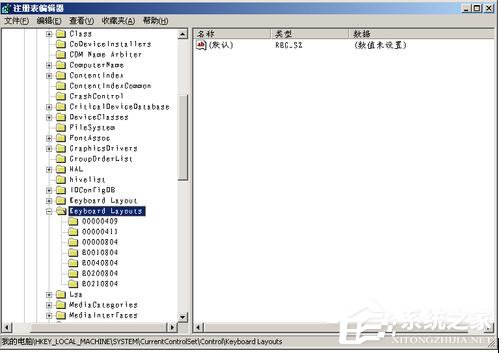
  2. 展開至 HKEY_LOCAL_MACHINE\SYSTEM\CurrentControlSet\Control\Keyboard Layouts。
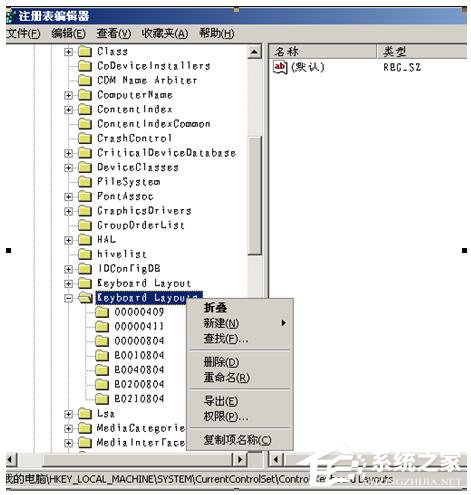
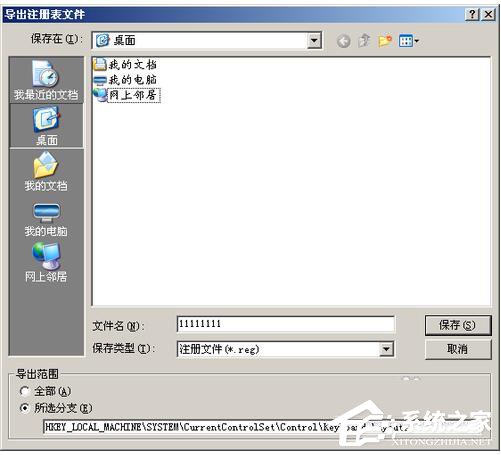
  3. 右鍵 Keyboard Layouts →「匯出」→ 存為 KeyboardLayouts.reg。
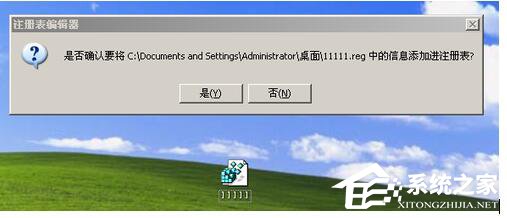
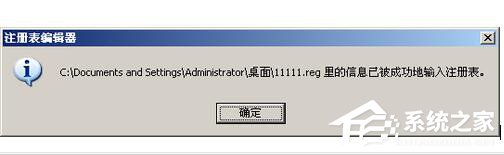
  4. 雙擊該 .reg 檔 →「是」匯入登錄 →「確定」。
  5. 重開機或登出重新登入驗證。

原理:匯出再匯入相當於重建機碼權限與結構,修復損毀的子機碼/值。若無效,請檢查鍵盤硬體、更換 PS/2 或 USB 埠、更新鍵盤驅動程式。

Copyright © Windows教程網 All Rights Reserved