Windows XP Windows 7 Windows 2003 Windows Vista Windows 綜合教學 Linux 系統教學
Windows 10 Windows 8 Windows 2008 Windows NT Windows Server 電腦軟體教學

ThinkPad E430 裝 WinXP 無法啟用獨顯?BIOS 強制指定整合顯示晶片即可

編輯:XP 系統應用技巧

E430/E430C/E530 等機種裝 XP 後,獨立顯卡在裝置管理員顯示「未知裝置」無法安裝驅動。原因:XP 不支援 Optimus 切換技術,必須在 BIOS 強制使用整合顯卡。

BIOS 設定步驟

  1. 開機按 F1 進入 BIOS。
  2. 選單:Config → Display → 將 Graphics Device 改為 Integrated Graphics。
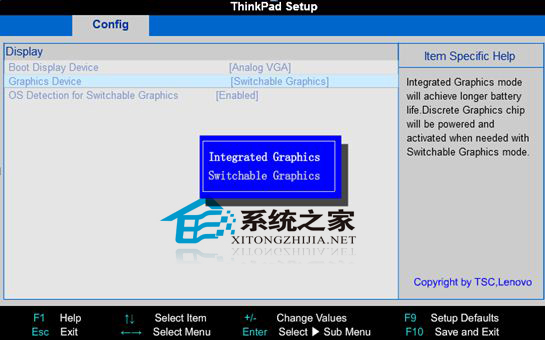
  3. 按 F10(或 Fn+F10)存檔離開。

BIOS Display 設定 Integrated Graphics

設定後系統僅使用整合顯卡(Intel HD 4000),獨顯(NVIDIA NVS 5200M/GT 620M)將被禁用,但至少系統可正常顯示與安裝驅動。若需獨顯效能,建議改裝 Win7/Win10。

Copyright © Windows教程網 All Rights Reserved