執行 msconfig 提示「找不到檔案」?Msconfig.exe (系統組態工具) 可能被誤刪、病毒清除、或系統檔損壞。WinXP 在 %systemroot%\system32\dllcache 保有備份,只需複製回 %systemroot%\PCHealth\HelpCtr\Binaries 即可恢復。本文提供圖文步驟與命令列快速修復法。
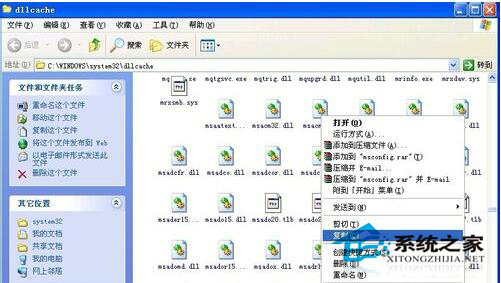
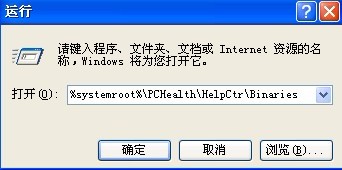
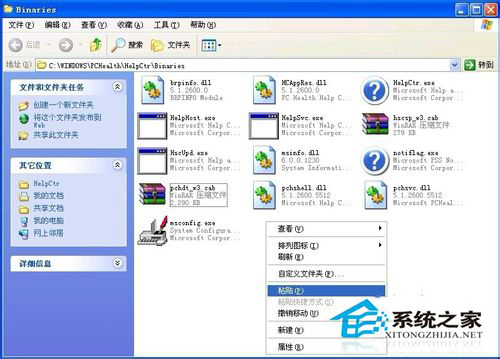
%systemroot%\system32\dllcache → 確定開啟快取資料夾。Msconfig.exe → 右鍵「複製」。%systemroot%\PCHealth\HelpCtr\Binaries → 確定開啟目標資料夾。msconfig 驗證正常開啟。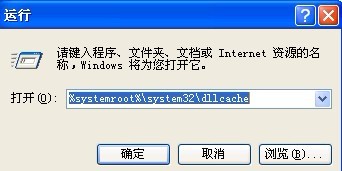
copy %systemroot%\system32\dllcache\msconfig.exe %systemroot%\PCHealth\HelpCtr\Binaries\msconfig.exe
cmd → 貼上上述指令 → Enter。C:\Windows\PCHealth\HelpCtr\Binaries\Msconfig.exe。I386\MSCONFIG.EX_ 用 expand 指令展開:expand D:\I386\MSCONFIG.EX_ C:\Windows\PCHealth\HelpCtr\Binaries\Msconfig.exe (假設光碟機 D:)。sfc /scannow 修復所有系統檔 (需光碟/映像來源)。一分鐘複製檔案,找回強大的系統組態工具,輕鬆優化 WinXP 開機與服務。