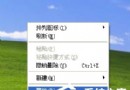
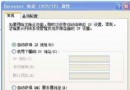
XP 系統中若 .exe 執行檔無法開啟、或點擊後詢問「用什麼程式開啟」,通常是登錄檔中 HKEY_CLASSES_ROOT\.exe 與 exefile 關聯鍵值遺失或損壞。本文教你製作 .reg 修復檔,匯入登錄檔即可恢復預設關聯。
fix_exe.reg。Windows Registry Editor Version 5.00
[HKEY_CLASSES_ROOT\.exe]
@="exefile"
"Content Type"="application/x-msdownload"
[HKEY_CLASSES_ROOT\.exe\PersistentHandler]
@="{098f2470-bae0-11cd-b579-08002b30bfeb}"
[HKEY_CLASSES_ROOT\exefile]
@="應用程式"
"EditFlags"=hex:38,07,00,00
"TileInfo"="prop:FileDescription;Company;FileVersion"
"InfoTip"="prop:FileDescription;Company;FileVersion;Create;Size"
[HKEY_CLASSES_ROOT\exefile\DefaultIcon]
@="%1"
[HKEY_CLASSES_ROOT\exefile\shell]
[HKEY_CLASSES_ROOT\exefile\shell\open]
"EditFlags"=hex:00,00,00,00
[HKEY_CLASSES_ROOT\exefile\shell\open\command]
@="\"%1\" %*"
[HKEY_CLASSES_ROOT\exefile\shell\runas]
[HKEY_CLASSES_ROOT\exefile\shell\runas\command]
@="\"%1\" %*"
[HKEY_CLASSES_ROOT\exefile\shellex]
[HKEY_CLASSES_ROOT\exefile\shellex\DropHandler]
@="{86C86720-42A0-1069-A2E8-08002B30309D}"
[HKEY_CLASSES_ROOT\exefile\shellex\PropertySheetHandlers]
[HKEY_CLASSES_ROOT\exefile\shellex\PropertySheetHandlers\PifProps]
@="{86F19A00-42A0-1069-A2E9-08002B30309D}"
[HKEY_CLASSES_ROOT\exefile\shellex\PropertySheetHandlers\ShimLayer Property Page]
@="{513D916F-2A8E-4F51-AEAB-0CBC76FB1AF8}"
[HKEY_CLASSES_ROOT\exefile\shellex\PropertySheetHandlers\{B41DB860-8EE4-11D2-9906-E49FADC173CA}]
@=""
[HKEY_LOCAL_MACHINE\SOFTWARE\Classes\.exe]
@="exefile"
"Content Type"="application/x-msdownload"
[HKEY_LOCAL_MACHINE\SOFTWARE\Classes\.exe\PersistentHandler]
@="{098f2470-bae0-11cd-b579-08002b30bfeb}"
[HKEY_LOCAL_MACHINE\SOFTWARE\Classes\exefile]
@="應用程式"
"EditFlags"=hex:38,07,00,00
"TileInfo"="prop:FileDescription;Company;FileVersion"
"InfoTip"="prop:FileDescription;Company;FileVersion;Create;Size"
[HKEY_LOCAL_MACHINE\SOFTWARE\Classes\exefile\DefaultIcon]
@="%1"
[HKEY_LOCAL_MACHINE\SOFTWARE\Classes\exefile\shell]
[HKEY_LOCAL_MACHINE\SOFTWARE\Classes\exefile\shell\open]
"EditFlags"=hex:00,00,00,00
[HKEY_LOCAL_MACHINE\SOFTWARE\Classes\exefile\shell\open\command]
@="\"%1\" %*"
[HKEY_LOCAL_MACHINE\SOFTWARE\Classes\exefile\shell\runas]
[HKEY_LOCAL_MACHINE\SOFTWARE\Classes\exefile\shell\runas\command]
@="\"%1\" %*"
[HKEY_LOCAL_MACHINE\SOFTWARE\Classes\exefile\shellex]
[HKEY_LOCAL_MACHINE\SOFTWARE\Classes\exefile\shellex\DropHandler]
@="{86C86720-42A0-1069-A2E8-08002B30309D}"
[HKEY_LOCAL_MACHINE\SOFTWARE\Classes\exefile\shellex\PropertySheetHandlers]
[HKEY_LOCAL_MACHINE\SOFTWARE\Classes\exefile\shellex\PropertySheetHandlers\PifProps]
@="{86F19A00-42A0-1069-A2E9-08002B30309D}"
[HKEY_LOCAL_MACHINE\SOFTWARE\Classes\exefile\shellex\PropertySheetHandlers\ShimLayer Property Page]
@="{513D916F-2A8E-4F51-AEAB-0CBC76FB1AF8}"
[HKEY_LOCAL_MACHINE\SOFTWARE\Classes\exefile\shellex\PropertySheetHandlers\{B41DB860-8EE4-11D2-9906-E49FADC173CA}]
@=""
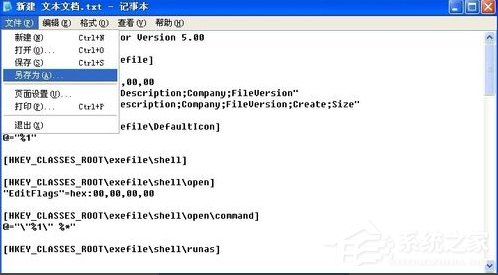
fix_exe.reg,確認匯入登錄檔。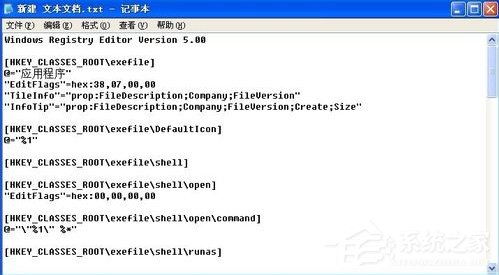
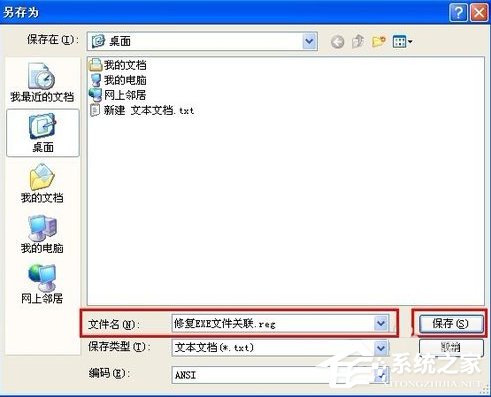
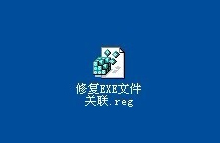
若覺得手動製作麻煩,可下載現成的「EXE 檔案關聯修復器」一鍵修復。