資料夾選項裡切換「顯示隱藏檔案」、「隱藏已知副檔名」需多層點擊。本文提供 Registry + VBS 腳本方案,右鍵選單直接切換,自動重新整理,極致便利。
SuperHidden.reg:REGEDIT4
[HKEY_CLASSES_ROOT\Directory\Background\shellex\ContextMenuHandlers\SuperHidden]
@="{00000000-0000-0000-0000-000000000012}"
[HKEY_CLASSES_ROOT\CLSID\{00000000-0000-0000-0000-000000000012}\InProcServer32]
@=hex(2):25,53,79,73,74,65,6d,52,6f,6f,74,25,5c,73,79,73,74,65,6d,33,32,5c,73,68,64,6f,63,76,77,2e,64,6c,6c,00
"ThreadingModel"="Apartment"
[HKEY_CLASSES_ROOT\CLSID\{00000000-0000-0000-0000-000000000012}\Instance]
"CLSID"="{3f454f0e-42ae-4d7c-8ea3-328250d6e272}"
[HKEY_CLASSES_ROOT\CLSID\{00000000-0000-0000-0000-000000000012}\Instance\InitPropertyBag]
"method"="ShellExecute"
"Param1"="SuperHidden.vbs"
"command"="顯示/隱藏[系統檔案,副檔名]"
"CLSID"="{13709620-C279-11CE-A49E-444553540000}"
[HKEY_CURRENT_USER\Software\Microsoft\Windows\CurrentVersion\Explorer\Advanced]
"ShowSuperHidden"=dword:00000000
"Hidden"=dword:00000002
SuperHidden.vbs:' Show/Hide System Files
Dim WSHShell
Set WSHShell = WScript.CreateObject("WScript.Shell")
sTitle1 = "SSH=0"
sTitle2 = "SSH=1"
If WSHShell.RegRead("HKCU\Software\Microsoft\Windows\CurrentVersion\Explorer\Advanced\ShowSuperHidden") = 1 Then
WSHShell.RegWrite "HKCU\Software\Microsoft\Windows\CurrentVersion\Explorer\Advanced\ShowSuperHidden", "0", "REG_DWORD"
WSHShell.RegWrite "HKCU\Software\Microsoft\Windows\CurrentVersion\Explorer\Advanced\Hidden", "2", "REG_DWORD"
WSHShell.RegWrite "HKCU\Software\Microsoft\Windows\CurrentVersion\Explorer\Advanced\HideFileExt", "1", "REG_DWORD"
WSHShell.RegWrite "HKCR\CLSID\{00000000-0000-0000-0000-000000000012}\Instance\InitPropertyBag\command", "顯示[系統檔案,副檔名]", "REG_SZ"
WSHShell.SendKeys "{F5}+{F10}e"
Else
WSHShell.RegWrite "HKCU\Software\Microsoft\Windows\CurrentVersion\Explorer\Advanced\ShowSuperHidden", "1", "REG_DWORD"
WSHShell.RegWrite "HKCU\Software\Microsoft\Windows\CurrentVersion\Explorer\Advanced\Hidden", "1", "REG_DWORD"
WSHShell.RegWrite "HKCU\Software\Microsoft\Windows\CurrentVersion\Explorer\Advanced\HideFileExt", "0", "REG_DWORD"
WSHShell.RegWrite "HKCR\CLSID\{00000000-0000-0000-0000-000000000012}\Instance\InitPropertyBag\command", "隱藏[系統檔案,副檔名]", "REG_SZ"
WSHShell.SendKeys "{F5}+{F10}e"
End If
Set WSHShell = Nothing
WScript.Quit(0)
SuperHidden.vbs 複製至 %windir%\system32\(或 %windir%\system\ XP)。SuperHidden.reg 匯入登錄。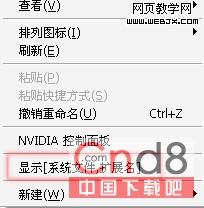
shdocvw.dll 的 ShellExecute 介面。ShowSuperHidden、Hidden、HideFileExt 三鍵值狀態,翻轉寫入。SendKeys "{F5}+{F10}e" 模擬 F5 重新整理 + Shift+F10 右鍵選單 + e 確認,實現視覺即時更新。System32 需管理員權限;亦可放任意路徑,修改 Registry 中 Param1 為完整路徑。SuperHidden.vbs 路徑、檔名大小寫、Registry 匯入是否成功。