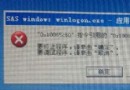
C 槽磁碟重組掃描到 C:\Windows\Prefetch\WMIPRVSE.EXE-28F301A9.pf 損壞而中止?此為預讀技術產生的快取檔損壞所致。
XP 預讀技術會在 C:\Windows\Prefetch 建立 *.pf 檔案加速程式啟動。長期使用會產生死連結/損壞檔案,導致重組掃描失敗。
解法: 進入 C:\Windows\Prefetch,僅刪除報錯的該個 .pf 檔案(或少數可疑檔案),不要全刪(除非重組仍報錯或開機異常)。重組即可順利完成。
定期清理 Prefetch 可避免類似問題,但保留多數檔案以維持啟動加速效果。