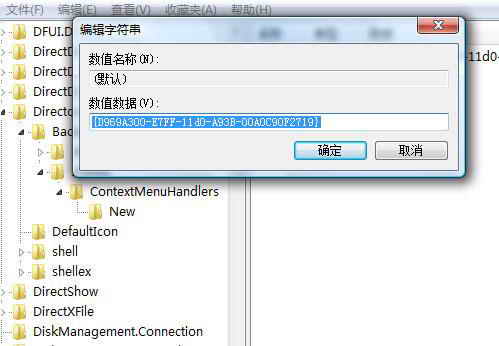
右鍵「新增」選單不見「資料夾」項目,因 HKEY_CLASSES_ROOT\Directory\Background\shellex\ContextMenuHandlers\New 缺少預設字串值。修復:
HKEY_CLASSES_ROOT\Directory\Background\shellex\ContextMenuHandlers\New
regedit
{D969A300-E7FF-11d0-A93B-00A0C90F2719}
⚠ 提醒:登錄檔操作有風險,建議先匯出備份該分支。
Vista 關機/睡眠/休眠完全攻略:修改電源按鈕行為、喚醒休眠、清理休眠檔、模式差異解析
自訂 Windows Vista 媒體中心開始選單
Vista 桌面主題安裝完整指南:.theme 與 .msstyles 兩種格式差異與佈署方式
Vista 影響硬碟壽命的因素分析與保護設定
Vista 下 QQ 語音無聲(對方聽不到我)完整排查與解決教學
Vista 關閉自動播放功能,阻擋 USB 病毒傳播途徑
Vista 系統 10 大專家級應用與維護技巧全攻略
Vista 系統盤 C:\Users 深度解析:資料隔離、Public 共享與遷移備份全指南