Windows Server Backup 內建於 Server 2008 所有版本,預設未安裝。支援排程自動備份、裸機復原、磁碟區/檔案/應用程式級備份。
安裝步驟
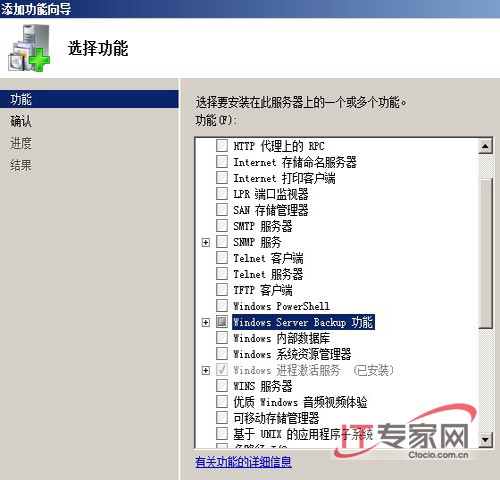
- 伺服器管理員 → 左側「功能」→ 右側「新增功能」。
- 勾選「Windows Server Backup」 (建議同勾「Windows 復原光碟」)。
- 下一步 → 安裝 → 關閉。
安裝完成後,「管理工具」與「所有程式 → 維護」將出現「Windows Server Backup」與「建立復原光碟」選項。
核心功能
- 一次性備份 / 排程備份 (每日/每週)。
- 備份目標:本機磁碟、遠端共享、光碟、可移動媒體。
- VSS 整合:應用程式一致性備份 (SQL、Exchange、AD)。
- 復原:檔案/資料夾、磁碟區、應用程式、系統狀態、裸機復原 (需 Windows 復原環境)。
- 命令列
wbadmin 支援腳本自動化。
後續將示範排程備份設定、裸機復原演練、遠端共享備份最佳實務。