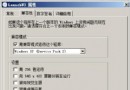
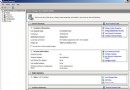
64 位 Windows Server 2008 上,ASP.NET 應用呼叫 Microsoft.Office.Interop.Excel 時拋出錯誤:
檢索 COM 類工廠中 CLSID 為 {00024500-0000-0000-C000-000000000046} 的組件時失敗。
64 位系統下,預設的 dcomcnfg.exe 是 64 位版本,無法顯示 32 位的 Office COM 元件(如 Microsoft Excel Application),導致無法配置 DCOM 權限。
mmc -32 開啟 32 位主控台。NETWORK SERVICE(選擇本機電腦)→ 賦予「本機啟動」與「本機啟用」權限。NETWORK SERVICE → 賦予「本機存取」權限。在 IIS 管理員中,將該網站對應的應用程式集區 Advanced Settings → Identity 設為 LocalSystem 或 NetworkService,確保具有足夠權限啟動 Excel COM 物件。
完成上述步驟後,64 位 Server 2008 即可正常透過 Office Interop 操作 Excel。
Windows Server 2008 疑難雜症破解:系統還原點無法建立、執行命令不記憶兩大案例實戰
Windows Server 2008 R2 修改 SID 完整教學:Sysprep 實戰與避坑指南
Hyper-V 實戰:利用差異磁碟與 Sysprep 快速部署多台 Windows Server 2008
Windows Server 2008 R2 Active Directory 資料庫維護:NTDS.dit 壓縮整理與移動至專用磁碟 (ntdsutil 實戰)
申請正版 Windows Server 2008 / R2 產品金鑰 (DreamSpark 學生授權流程)
Windows Server 2008 進階安全實作五大場景:軟體限制原則封鎖迅雷/病毒、防火牆阻擋 Ping 攻擊、代理鎖定上網權限、強制斷開遠端連線
解決 Windows Server 2008 R2 安裝 SP1 失敗錯誤 0x800f0818:系統更新就緒工具修復元件存儲