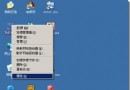
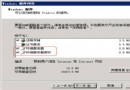
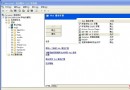
Windows Server 2003 預設主題較為簡樸,許多習慣 Windows XP 經典外觀的使用者希望能在 Server 2003 上啟用 XP 風格主題。實際上只需啟動「佈景主題」服務即可輕鬆實現。
services.msc
完成以上步驟後,Windows Server 2003 即可擁有與 Windows XP 相同的視覺風格,包括藍色任務列、圓角視窗等經典元素,讓伺服器操作介面更符合個人習慣。
Windows 伺服器遠端管理五大實用技巧與故障排解
Windows 2000/2003 刪除預設共享(C$、D$、ADMIN$、IPC$)三種方法:批次檔、啟動資料夾、登錄檔永久停用
Windows 虛擬內存深度優化指南:原理、設置與硬碟協同調優
Windows 常見高危連接埠關閉與木馬清除實戰指南
Windows Server 2003 IIS + PHP 5 + MySQL + phpMyAdmin 完整部署實戰
Windows 安全模式完整指南:進入方法與五大實用場景
刪除 Windows Server 2003 多餘的 wmpub 資料夾:替換 sfcfiles.dll 破解 WFP 保護
解決 Windows Server 2003 缺少 vids.cvid 解碼器導致視頻無法播放的問題