Windows XP Windows 7 Windows 2003 Windows Vista Windows 綜合教學 Linux 系統教學
Windows 10 Windows 8 Windows 2008 Windows NT Windows Server 電腦軟體教學
您现在的位置: Windows教程網 >> Windows教程 >  >> Windows 綜合教學 >> 關於 Windows

Windows 7 利用 ReadyBoost 將 USB 隨身碟當記憶體加速系統

編輯:關於 Windows

電腦記憶體不足導致卡頓?Windows 7 的 ReadyBoost 功能可將高速 USB 隨身碟當作快取記憶體,提升系統回應速度。

前置條件

  • USB 隨身碟標示「高速」或「支援 ReadyBoost」
  • 剩餘空間至少 256 MB

操作步驟

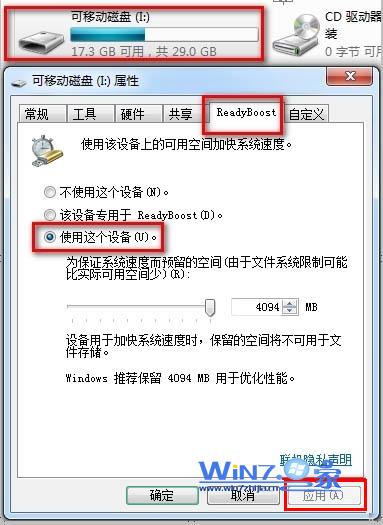
  1. 插入 USB 隨身碟 → 右鍵 → 「內容」
  2. 切換至「ReadyBoost」標籤
  3. 選擇「使用這個裝置」→ 設定「保留給系統加速的空間」
  4. 點選「套用」→「確定」

注意事項

  • 隨身碟必須格式化為 NTFS 格式
  • 隨身碟容量越大、速度越快,加速效果越明顯
  • 此功能為快取機制,非真實擴充實體記憶體

適合記憶體 4GB 以下的舊電腦,能明顯改善多工切換與大型程式載入速度。

Copyright © Windows教程網 All Rights Reserved