Windows XP Windows 7 Windows 2003 Windows Vista Windows 綜合教學 Linux 系統教學
Windows 10 Windows 8 Windows 2008 Windows NT Windows Server 電腦軟體教學
您现在的位置: Windows教程網 >> Windows教程 >  >> Windows 綜合教學 >> 關於 Windows

Win10 升級失敗 0x80070002?三大原因與對策

編輯:關於 Windows

Win8.1 升級 Win10 時在重啟階段報錯 0x80070002 並自動回滾,常見三大原因及解法:

原因一:多硬碟導致主分區識別錯誤

曾用 HDD 做系統盤,後加裝 SSD 為新系統盤,安裝程式可能誤讀舊分區資訊。
解法: 備份舊系統盤資料後重新分區格式化,或升級前暫時拔除舊硬碟,裝好再接回。

原因二:非 Microsoft 服務干擾

第三方服務(防毒、備份、驅動助手等)可能阻礙安裝程式。
解法: Win+R 輸入 msconfig → 服務頁籤 → 勾選「隱藏所有 Microsoft 服務」 → 全部停用 → 升級完成後再酌情啟用。
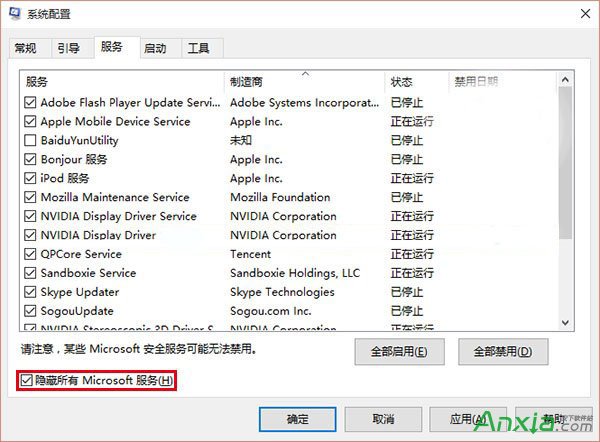
msconfig 隱藏 Microsoft 服務

原因三:防毒軟體即時掃描攔截

第三方防毒的即時監控會攔截系統檔案寫入。
解法: 升級前完全關閉即時掃描,甚至暫時解除安裝防毒軟體,升級成功後再裝回。

Copyright © Windows教程網 All Rights Reserved